Run Uppers
General Information
The Run Uppers trigger detects trader accounts with a "Low Start" strategy, where traders consistently generate profitable trades in recent transactions. This may indicate exploitation of dealing desk vulnerabilities.
Menu Navigation
To access this module, navigate to Risk Management > Event Triggers in the main sidebar and locate the Run Uppers card.
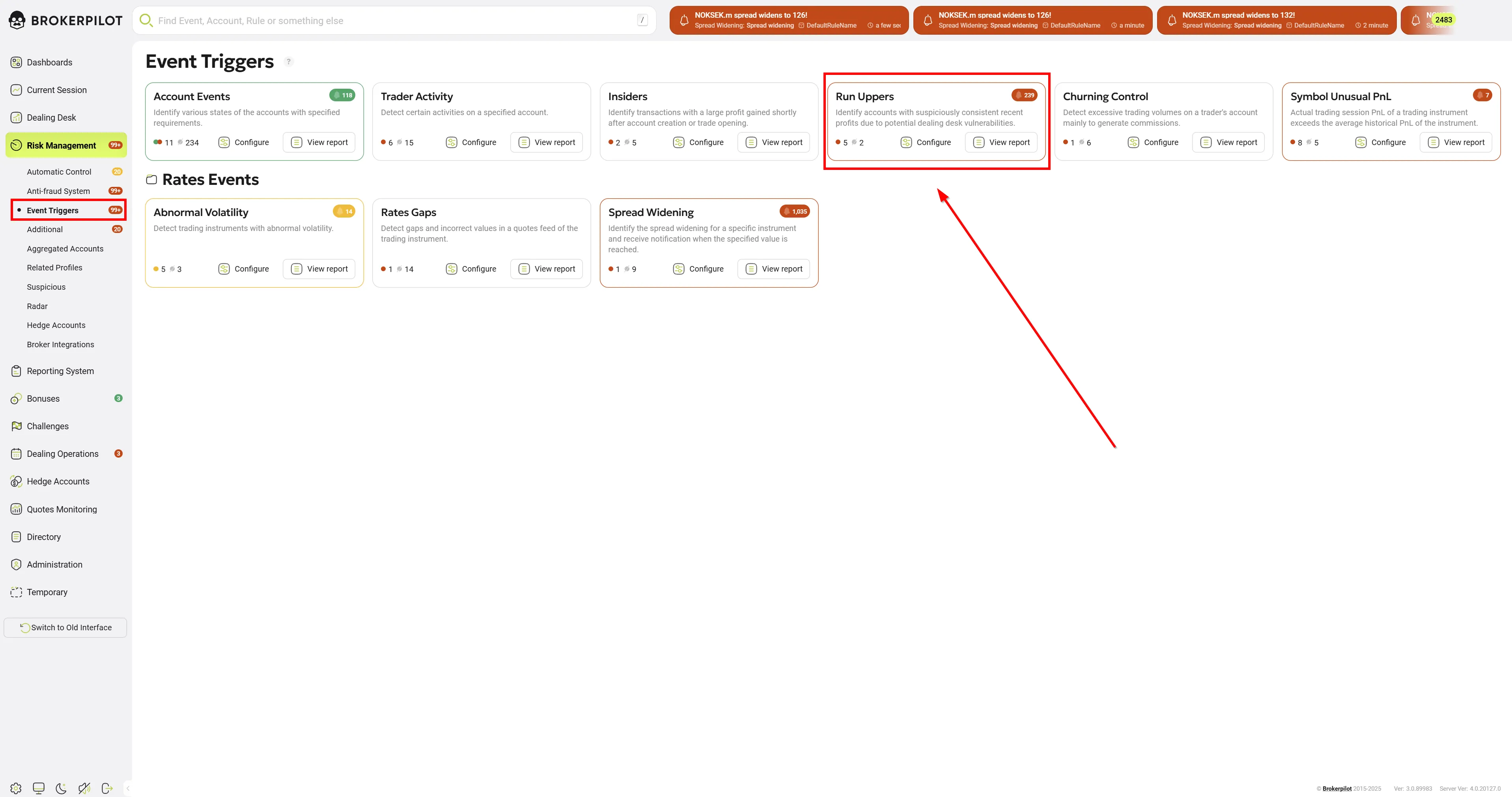
From the main card, you can view the number of active rules and quickly access the Configure or View report sections.
Configuring Rules
Clicking the Configure button on the Run Uppers card opens the rule management dashboard.
-
Server/Platform Filters: At the top of the screen, you can filter your existing rules by trading platforms and servers (e.g., All, MT4, MT5, cTrader).
-
Rule Management: Each existing rule is displayed in a list showing its State (Active/Inactive) and Details (Name and assigned Server). You can Edit or Delete (trash bin icon) any existing rule directly from this list.
-
Top Toolbar Options:
- Export/Import rules: Download your current configurations or upload existing ones, which is useful for backing up setups or migrating them between environments.
- Add rule: Click this button to create a new monitoring configuration.
Adding or Editing a Rule
When you choose to add a new rule or edit an existing one, you will need to define the following parameters:
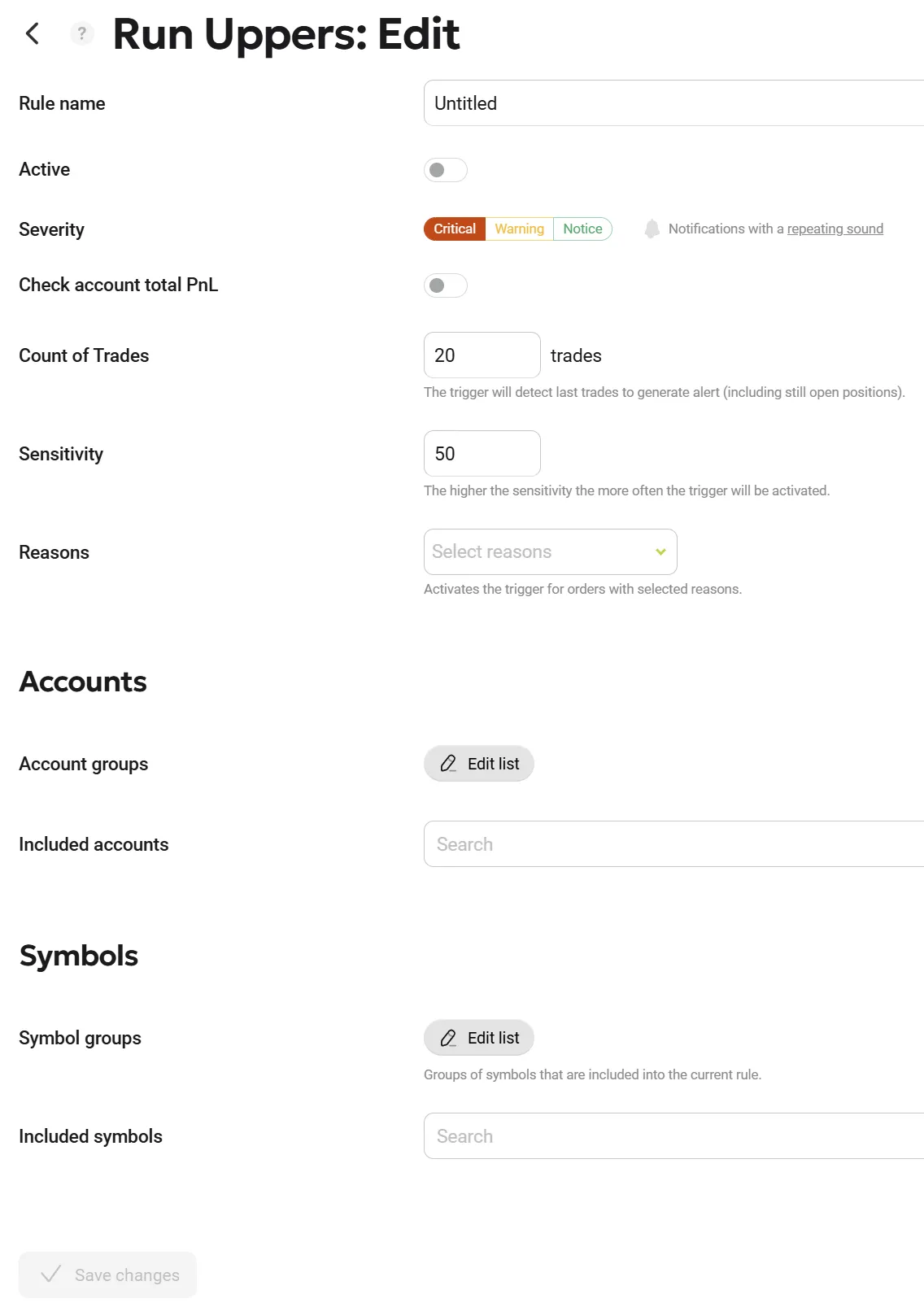
General Settings
| Parameter Name | Description |
|---|---|
| Rule name | Enter a clear, descriptive name for the trigger (e.g., "DefaultRuleName" or "VIP Accounts Check") |
| Active | Use this toggle switch to enable (turn on) or disable (turn off) the rule without needing to delete it. |
| Severity | Define the alert level generated when this trigger fires. You can choose between: Critical (Red), Warning (Yellow), Notice (Green) |
| Count of Trades | The number of most recent trades (including open orders) analyzed for profitability patterns. |
| Sensitivity | A notional value that defines the ratio of profitable trades to unprofitable trades. |
| Reasons | The trigger activates only for orders with the selected reason. |
Accounts
This section defines the scope of the accounts that the rule will monitor.
- Account groups: Click the Edit list button to open the side panel containing your server's folder structure. Here, you can select specific groups of accounts (e.g., demo groups, real groups, or specific B-book/A-book folders) to be included in the rule. Selected groups will appear in a list; you can remove them individually by clicking the trash bin icon next to their name.
- Included accounts: If you want to monitor specific, individual account numbers rather than an entire group, you can search for and add them using this dropdown field.
Once you have configured all the parameters, click the Save changes button on the left to apply the rule.
Permissions
| MT4 | MT5 |
|---|---|
| No specific permissions required. | No specific permissions required. |
Trigger Logic
The Run Uppers trigger is designed to detect periods of abnormal profitability by analyzing the ratio of gains to losses within a specific window of trades. Unlike simple PnL tracking, this trigger uses logarithmic scaling to normalize the impact of outlier trades.
Calculation Algorithm
The trigger performs the following steps to evaluate account activity:
-
Trade Selection: The system retrieves the $N$ most recent trades (defined by the Count of Trades setting) based on their Open Time.
-
Logarithmic Summation: The system calculates the natural logarithm (ln) of the absolute value of the profit/loss for each trade. These are summed into two separate variables:
profitLn: The sum of ln(|Profit|) for all profitable trades in the sample.lossLn: The sum of ln(|Loss|) for all losing trades in the sample.
-
Ratio Calculation: The system determines the performance ratio:
ratio = profitLn / lossLn -
Comparison: The calculated
ratiois compared against the Sensitivity parameter. If the ratio meets or exceeds the Sensitivity, an alert is triggered.
Calculation Example
Settings:
- Count of Trades: 5
- Sensitivity: 2.0
Sample Data (Last 5 trades):
| Trade # | Profit/Loss (USD) | Absolute Value | ln(|x|) | Category |
|---|---|---|---|---|
| 1 | +$150 | 150 | 5.01 | profitLn |
| 2 | +$200 | 200 | 5.30 | profitLn |
| 3 | -$30 | 30 | 3.40 | lossLn |
| 4 | +$100 | 100 | 4.61 | profitLn |
| 5 | -$15 | 15 | 2.71 | lossLn |
Results:
- Total
profitLn: 5.01 + 5.30 + 4.61 = 14.92 - Total
lossLn: 3.40 + 2.71 = 6.11 - Final Ratio: 14.92 / 6.11 = 2.44
Outcome: Since 2.44 > 2.0 (Sensitivity), the trigger will ACTIVATE.
Technical Notes for Users
- Sensitivity: The higher the sensitivity, the more "aggressive" the winning streak must be to trigger the alert.
- Absolute Values: Using absolute values for logarithms ensures that the ratio compares the magnitude of wins versus the magnitude of losses.