Accounts
1. Purpose
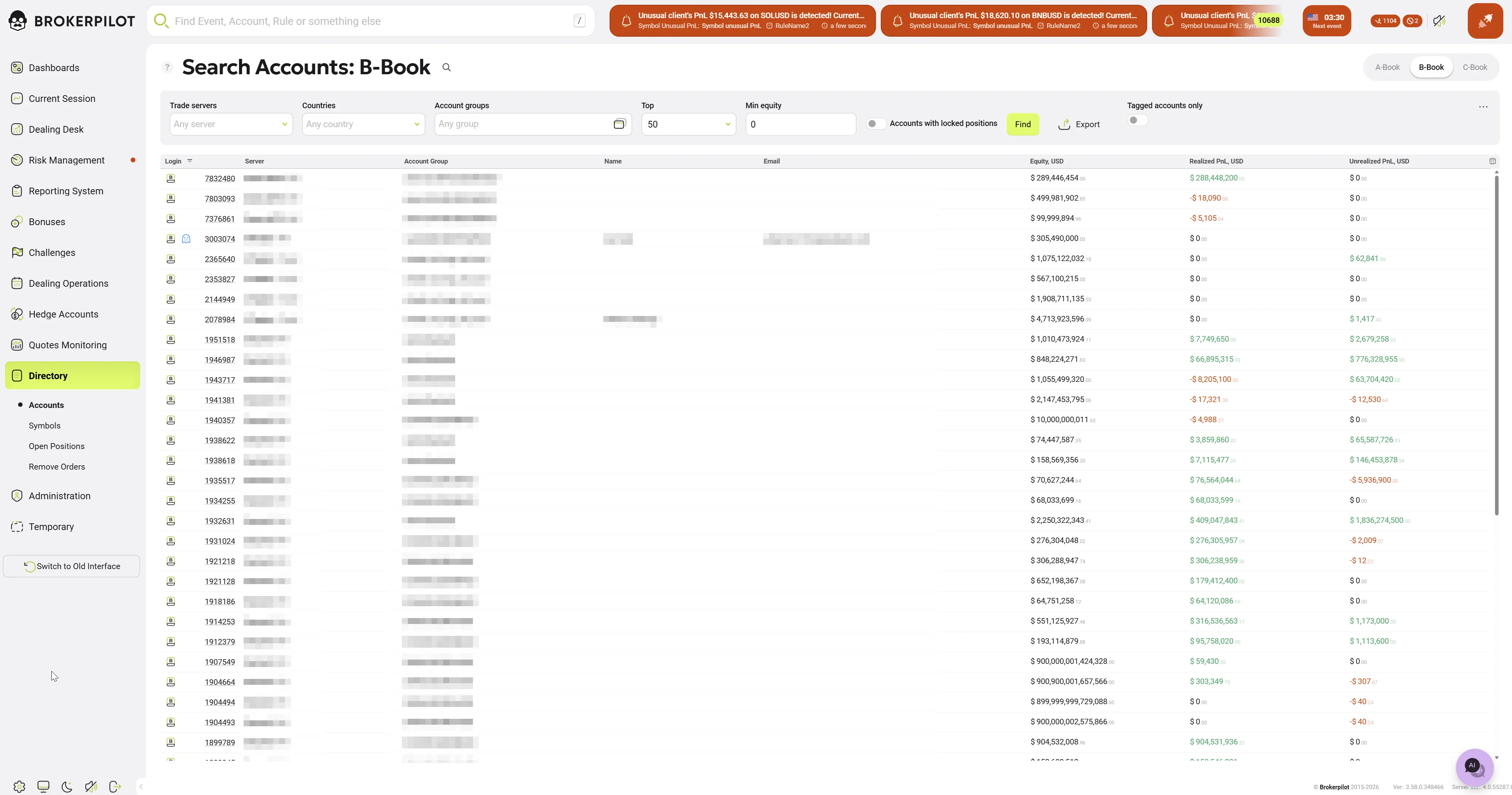
The Accounts page is a core administrative page of the Brokerpilot system. It provides real-time monitoring, filtering, and management of trading accounts. This interface allows dealers and risk managers to track equity, profitability, and account status across various trading servers (MT4, MT5, cTrader) in a single unified view and allows quick switching between different risk models: A-Book, B-Book, and C-Book.
2. Filtering & Search Criteria
The control panel at the top allows for precise data segmenting:
| Field | Description |
|---|---|
| Search | Full-text search by Login, Name, Email, UID, or IP address. |
| Trade Servers | Dropdown to filter by specific MT4/MT5 or cTrader servers. |
| Countries | Filter accounts based on the client's geographical location. |
| Account Groups | Filter by internal platform groups (e.g., demoStandard). |
| Top | Limit the results to a specific number (e.g., Top 50, 100, 500). |
| Min Equity | Show only accounts with equity exceeding a specific USD value. |
| Accounts with locked positions | When this toggle is enabled, the search output is filtered to display only accounts containing locked positions (i.e., simultaneous buy and sell orders for the exact same symbol). To inspect the specific positions in detail, click on an account to open its Account Information page. |
3. Account Data Table
The table displays live financial data. Key columns include:
Account Info
- Login / Server: The platform login ID and the specific server/platform icon (e.g., MetaTrader 4, MetaTrader 5, cTrader).
- Account Group: The specific server-side group assigned to the account.
- Name & Email: Personal identifier details for the account holder.
Financial Metrics (USD)
- Equity: The current floating value of the account. Large values are displayed in a clear, formatted style.
- Realized P&L: The total profit or loss from already closed trades.
- Green: Profit
- Red: Loss
- Unrealized P&L: The floating profit or loss of currently open positions.
4. Key Features
- Cross-Platform Visibility: Simultaneous monitoring of multiple trading platforms in one list.
- Real-Time Updates: Financial columns (Equity/P&L) refresh dynamically.
- Export Functionality: Allows downloading the filtered list of accounts for offline audit or reporting.
- Row Highlighting: Selected or hovered accounts are highlighted for better visual tracking.
5. Operational Use Cases
- High-Equity Monitoring: Identify the largest accounts in the C-Book to manage exposure.
- Loss Analysis: Identify accounts with significant realized losses for potential risk adjustment.
- Technical Audit: Verify that accounts are correctly assigned to the appropriate server and group.