Abnormal Price Jump
1. General Information
Sometimes the price of an instrument briefly "flickers": it jumps sharply away from the market level and returns almost immediately. Such events are called price spikes. They are dangerous for a broker because experienced traders (scalpers) learn to exploit them: they notice that the price regularly jumps to a certain level and back, place orders exactly at that level and profit from the predictable return. Everything happens within fractions of a second, so a dealer cannot catch it manually.
Not every sharp move is a problem, though. If the price "jumped" only because the spread (the difference between Ask and Bid) widened for a moment, this is normal market behaviour. The real danger is when both sides of the quote move together while the spread stays roughly the same – this means the market itself moved, or the liquidity provider sent a bad price.
The Abnormal Price Jump trigger monitors incoming quotes in real time and alerts the dealer when:
- the mid-price of an instrument changes by more than a configured threshold between two consecutive ticks;
- (optional) the jump is not caused by spread widening;
- (optional) the price returned close to its pre-jump level within a configured time window.
Each alert shows the jump size, the prices before and after, the spread state, the reversion time and a chart of the surrounding quotes, so the dealer can understand the cause without calculating anything manually. The trigger only notifies – it does not block trading or change any settings automatically.
Typical use cases
| Scenario | Recommended configuration |
|---|---|
| Catch any sharp price movement on a symbol | Jump detection only |
| Ignore moves caused by a momentary spread widening | Jump detection + Spread Filter |
| Catch "spike-and-return" patterns exploited by scalpers | Jump detection + Price Reversion (+ Spread Filter) |
2. Access and navigation
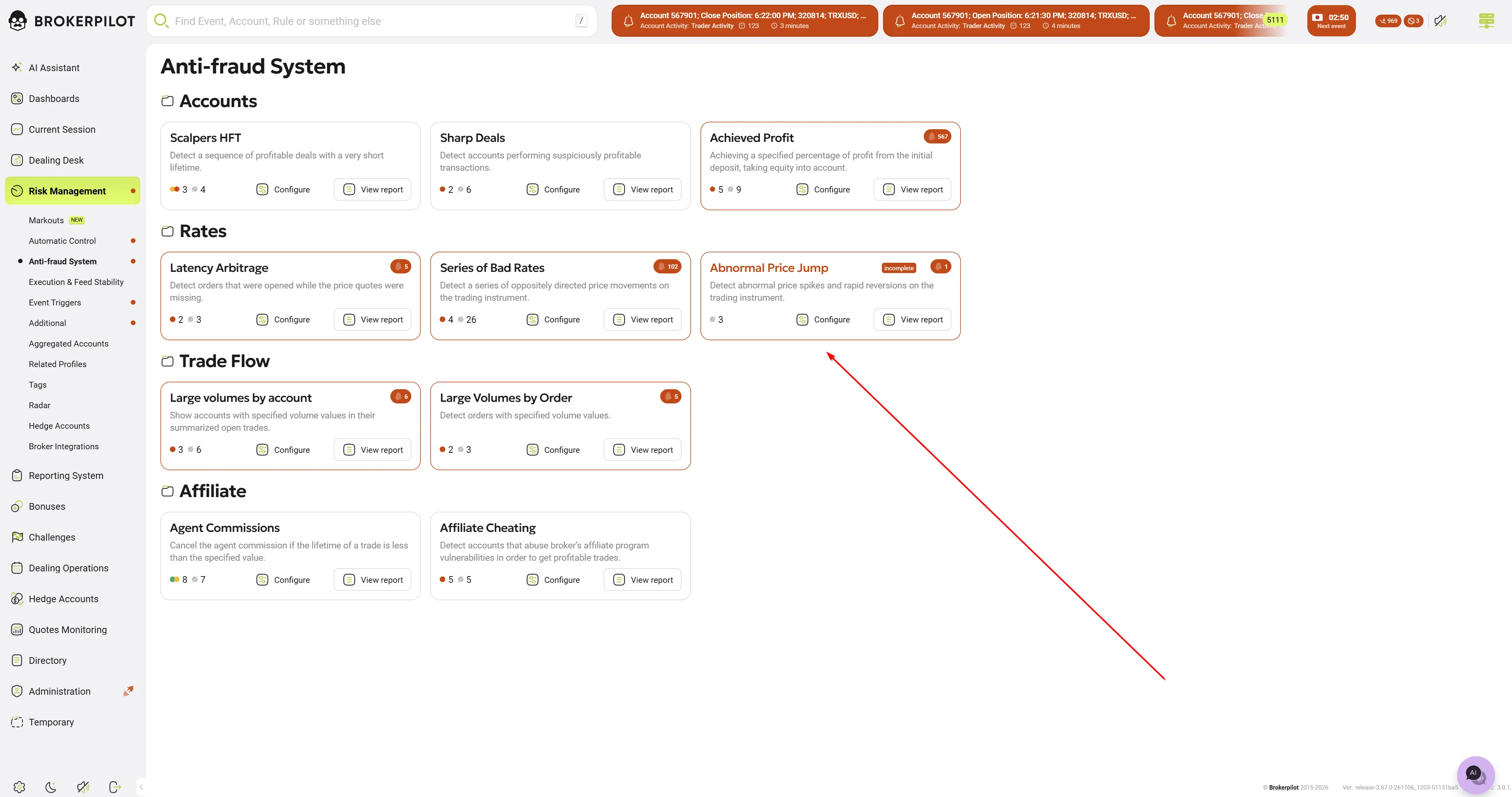
- Open Risk Management → Anti-fraud System.
- Find the Abnormal Price Jump card in the Rates block. The card shows the trigger description, rule counters and links.
- Use Configure to manage rules and View report to see detected events.
Permissions: the user needs the Anti-fraud System → Abnormal Price Jump permission (Administration → Users → permission form). Without it, the page is not available.
3. Rule settings
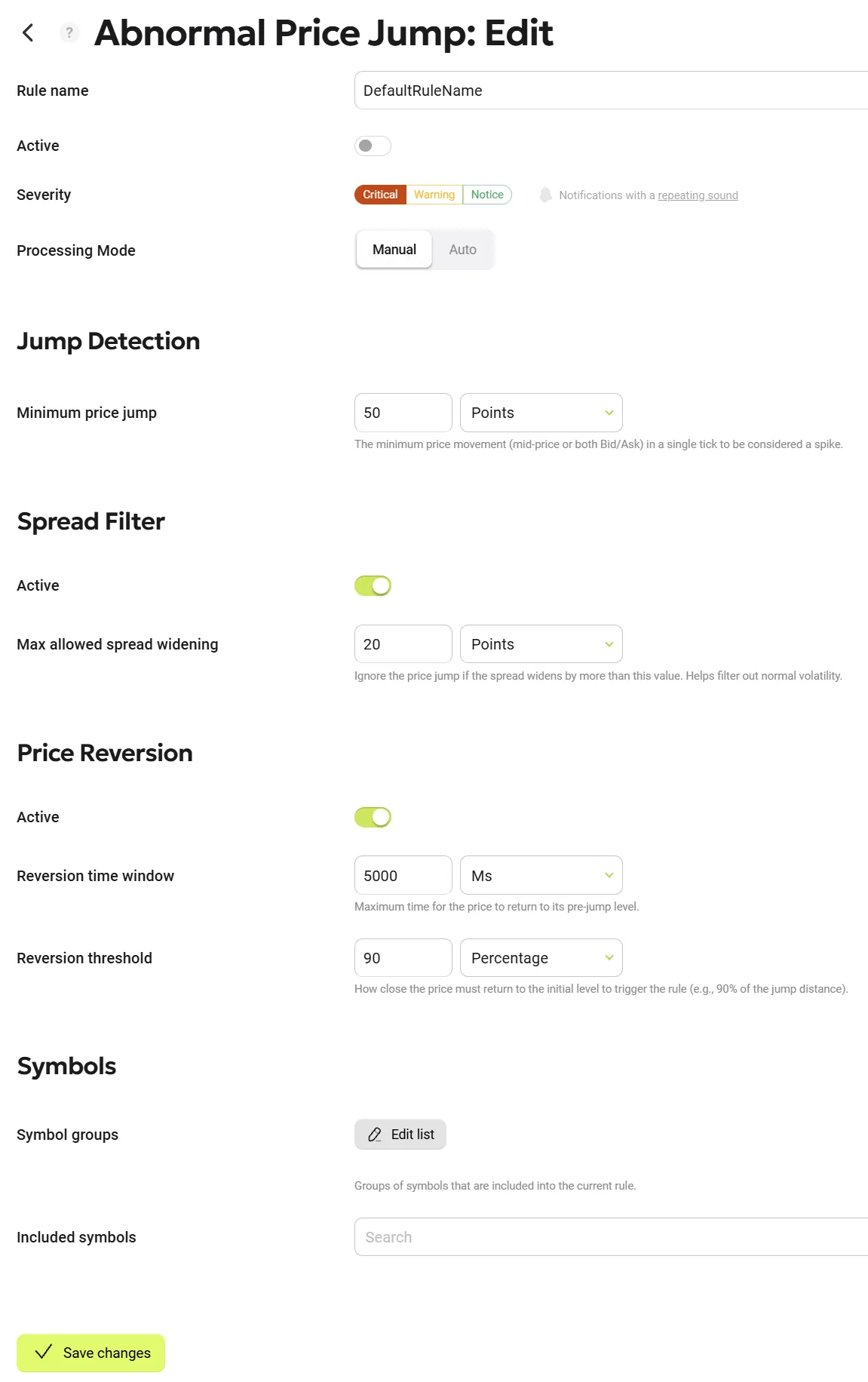
A rule consists of three blocks: general settings, jump-specific settings and symbol selection. New rules are created disabled by default.
3.1 General settings
| Field | Description |
|---|---|
| Rule name | Name of the rule shown in the report. |
| Active | Turns the rule on/off. |
| Severity | Alert level of the created events, plus notification settings. |
| Processing mode | Manual – events wait for a dealer to accept them; Auto – events are accepted automatically. |
3.2 Jump Detection
| Field | Unit | Description |
|---|---|---|
| Minimum price jump | Points / Percents | The minimum price movement (mid-price or both Bid/Ask) in a single tick to be considered a spike. |
- The jump is measured on the mid-price:
Mid = (Bid + Ask) / 2. - The comparison is always made against the immediately preceding tick. A series of small moves does not add up into one jump.
- An event is created when the jump is greater than or equal to the threshold.
- Validation: the value must be greater than 0; in percent mode, it must not exceed 100.
Note on points: because Bid and Ask are quoted with whole points, the mid-price changes in steps of 0.5 point. Jump values in points are therefore always multiples of 0.5 (e.g. 60.5, 61.0).
3.3 Spread Filter (optional)
| Field | Unit | Description |
|---|---|---|
| Use spread filter (toggle) | – | Enables the filter. |
| Max allowed spread widening | Points / Percents | Ignore the price jump if the spread widens by more than this value. Helps filter out normal volatility. |
How it works:
- Spread widening =
spread after the jump − spread before the jump. - In percent mode, the widening is measured relative to the spread before the jump.
- If the widening is above the limit, the jump is ignored (it is a spread widening, not a market move).
- If the spread narrowed or stayed the same, the filter is passed.
- If the spread returns to normal after an outlier that was already filtered out (for example, only Ask spiked and then came back), this is not treated as a jump. Repeated one-sided outliers filtered out by the spread filter do not generate alerts.
- A negative spread (Bid > Ask) passes the filter.
- Validation: the value must be greater than 0; in percent mode, it must not exceed 100.
3.4 Price Reversion (optional)
| Field | Unit | Description |
|---|---|---|
| Price Reversion (toggle) | – | Enables the reversion check. |
| Reversion time window | Milliseconds | Maximum time for the price to return to its pre-jump level. |
| Reversion threshold | Percents / Points | How close the price must return to the initial level to trigger the rule (e.g., 90% of the jump distance). |
When reversion is enabled, the alert is not sent at the moment of the jump. The trigger remembers the jump and waits for the price to come back:
- Threshold in percent – the price must cover at least the given share of the way back to the pre-jump mid-price. With a 90% threshold after a 60-point jump, the price must come back within 6 points of the pre-jump level. A 100% threshold requires an exact return to the pre-jump price.
- Threshold in points – the price must come back within N points of the pre-jump mid-price (the boundary is inclusive). The threshold must be less than the Minimum price jump; otherwise, the price right after the jump would already count as a return.
- If the price continues moving in the same direction, stays at the jump level, returns only partially, or returns after the time window, no alert is created.
- If a new jump occurs on the same symbol while the trigger is waiting, the waiting is restarted for the newest jump.
- Changing or disabling the rule cancels any waiting started under the old settings.
Validation:
| Setting | Allowed range |
|---|---|
| Reversion time window | 1 – 300,000 ms (up to 5 minutes) |
| Reversion threshold, percent mode | 1 – 100 % |
| Reversion threshold, points mode | > 0 and less than Minimum price jump (when it is also set in points) |
3.5 Symbols
| Field | Description |
|---|---|
| Symbol groups | Select symbol groups; use Edit list to adjust. |
| Included symbols | Select individual symbols (searchable list). |
If several enabled rules match the same symbol, the first matching rule is applied.
3.6 Default values
| Setting | Default |
|---|---|
| Active | Off |
| Minimum price jump | 50 points |
| Spread Filter | Off (Max allowed spread widening: 20 points) |
| Price Reversion | Off (threshold: 90 %) |
The defaults are starting points only. Tune the thresholds per instrument type (FX majors, metals, indices, crypto), since a "normal" tick move differs greatly between them.
4. How detection works
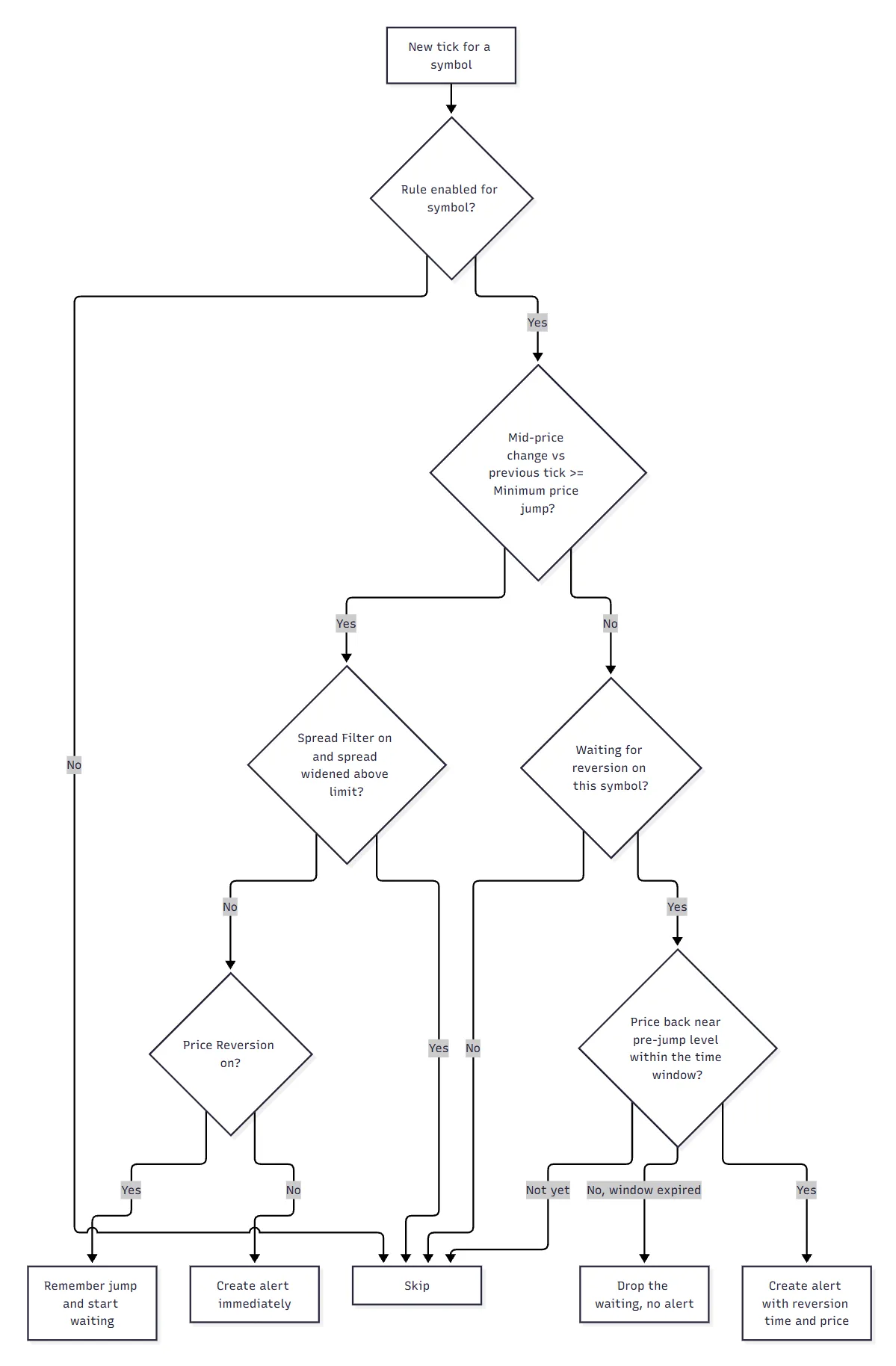
Anti-spam
For each symbol, a repeated alert is suppressed if the previous one was created less than 60 seconds ago. This works in both Manual and Auto processing modes.
5. Alerts
5.1 Report list
Events appear in the trigger report (View report). The Details column shows a short summary, for example:
Detected price spike: EURUSD jumped by 15.5 points!
5.2 Event details panel
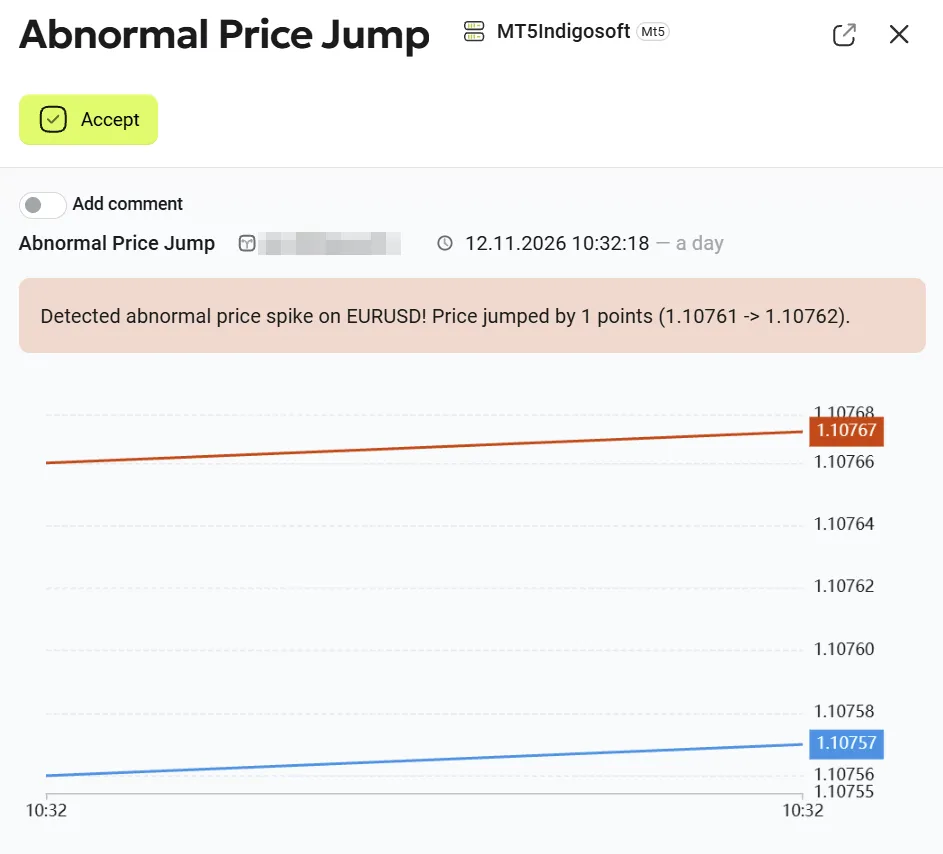
The panel (title: Abnormal Price Jump: Report) contains the standard actions (Accept, comments) and a chart of the quotes around the event. The highlighted message box is built dynamically depending on which filters are enabled:
| Part | When shown | Text |
|---|---|---|
| Base | Always | Detected abnormal price spike on {Symbol}! Price jumped by {JumpValue} {points / %} ({OldMid} -> {NewMid}). |
| Spread | Spread Filter on | The spread filter is passed (max allowed: {MaxSpreadWidening} {unit}, actual: {Widening} {unit}). |
| Spread (narrowing / negative spread) | Spread Filter on, spread did not widen | The spread filter is passed (max allowed: {MaxSpreadWidening} {unit}): the current spread is negative or widening is nonpositive; no percentage measurement is required. |
| Reversion | Price Reversion on | Price reverted back to {ReversionPrice} within {ReversionMilliseconds} ms. |
Examples
All filters enabled:
Detected abnormal price spike on EURUSD! Price jumped by 15.5 points (1.05000 -> 1.05155). The spread filter is passed (max allowed: 20 points, actual: 0.5 points). Price reverted back to 1.05010 within 450 ms.
Reversion disabled (alert at the moment of the jump):
Detected abnormal price spike on GBPJPY! Price jumped by 45 points (180.500 -> 180.950). The spread filter is passed (max allowed: 5 points, actual: 2 points).
Jump detection only:
Detected abnormal price spike on XAUUSD! Price jumped by 120 points (2050.00 -> 2062.00).
5.3 Chart
Each event stores a snapshot of quotes around the jump:
- reversion off – quotes before and including the jump tick;
- reversion on – additionally, quotes between the jump and the return.
6. Edge cases
| Situation | Behaviour |
|---|---|
| First tick of a symbol after start | Stored as a reference; no jump is calculated. |
| Ticks arrive out of order | Ticks are sorted by time; strictly older ticks and exact duplicates are ignored. |
| Several ticks with the same timestamp but different prices | All are processed (normal on MT4/Libertex). |
| One-sided quote (Bid = 0 or Ask = 0, typical for cTrader) | The missing side is taken from the last known quote of the symbol. |
| Disconnect / reconnect to the trade server | State is reset, so the first tick after reconnecting does not produce a false jump. |
| Session open / weekend gap | Treated as a real jump and alerted. Disable the rule for those hours if needed. |
| Node restart while waiting for a reversion | The waiting is lost; no alert is created for it. |
| Symbol deleted from the platform | The symbol is removed from the rules, and its state is cleared. |
| Instrument digits unknown | Points-based rules skip the tick; percent-based rules still work. |
7. Platform limitations
The trigger processes every tick it receives, but the resolution of the quote stream is defined by the platform node:
| Platform | Limitation |
|---|---|
| MetaTrader 5 | The node aggregates quotes per symbol every 10 ms. Spikes that start and revert within one 10 ms interval are not visible. |
| MetaTrader 4, Libertex | Quote timestamps have 1-second resolution. The order of ticks within one second follows their arrival order. Reversion time is measured by the node's server clock, so it is still reported in milliseconds. |
| cTrader | One-sided quotes are merged with the last known quote (see Edge cases). |
8. Recommendations
- Start with Price Reversion on and the Spread Filter on to focus on the scalper-exploitable "spike-and-return" pattern with minimal noise.
- Use points for instruments with a stable price level (FX) and percent for instruments with very different price levels (indices, crypto).
- Keep the reversion threshold in points well below the Minimum price jump.
- Note that with reversion enabled, one-directional jumps (the price moved and did not come back) are not reported. Create a second rule without reversion if you need both.