November 8, 2026
Release version 3.66.0
✨ New Features & Enhancements
Markouts tab in the account information page
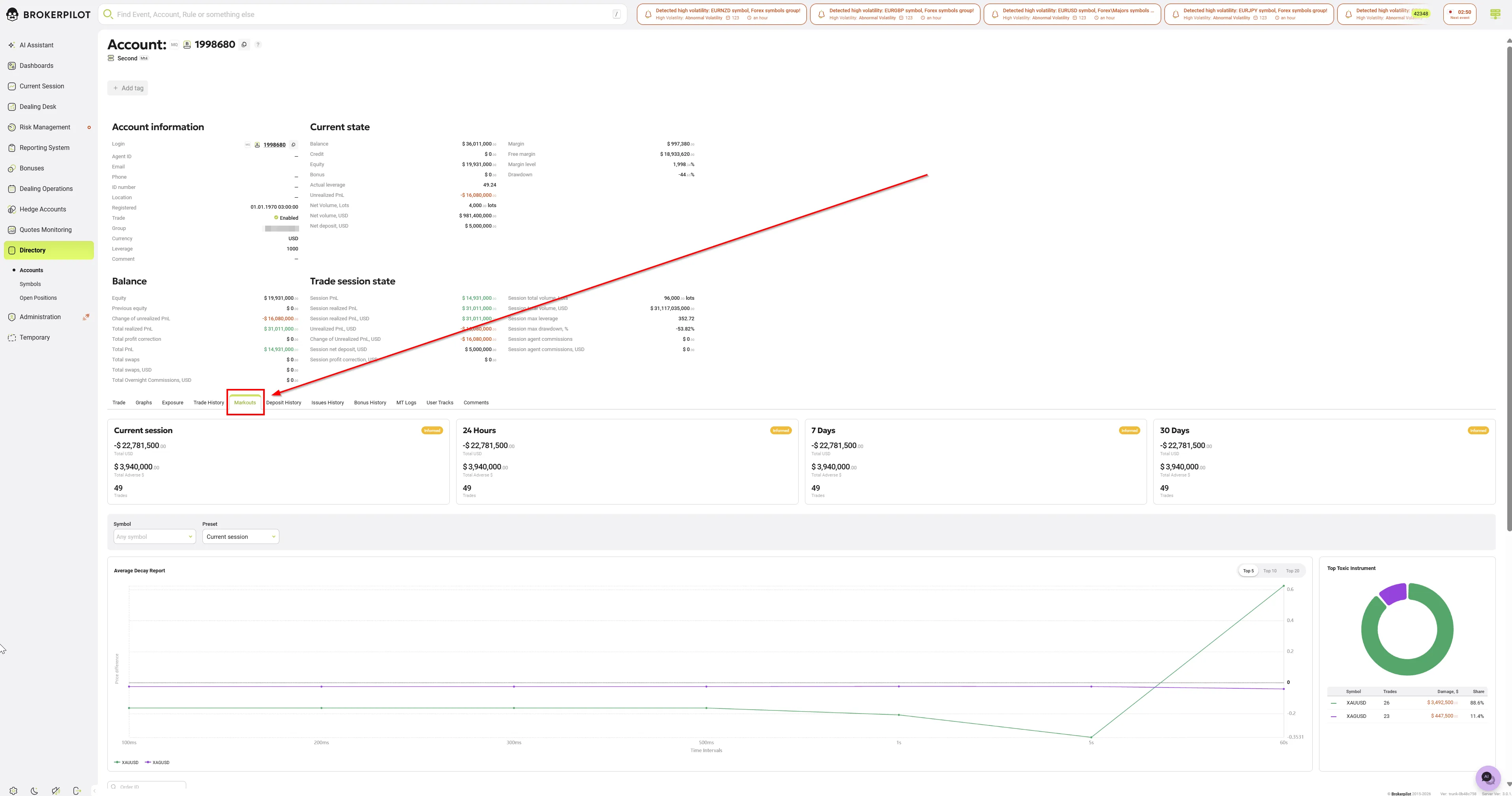
Dealers can now judge how toxic a client's flow is without leaving the account card. The new Markouts tab includes:
- Summary widgets for four periods: Current session, 24h, 7d and 30d. Each widget shows the total result, the amount lost on trades that went against the broker (Adverse), the number of trades and the client's risk class.
- Average Decay Report: one curve per symbol showing how the price moves on average after the client opens a trade, measured at 100 ms, 200 ms, 300 ms, 500 ms, 1 s, 5 s and 60 s. A curve that rises means the client keeps entering just before the price moves. Use the Top 5 / 10 / 20 switch to focus on the most damaging symbols.
- Top Toxic Instrument: a donut chart and a table (Symbol, Trades, Damage, $, Share) showing which symbols cost the broker the most. Share is always counted against the account's total damage, so if you select only some symbols the shares add up to less than 100%.
- Filter for the two reports: Current session, 24h, 7d, 30d or a Custom period of whole days within the last 90 days, plus a symbol selection. The filter does not change the summary widgets or the trade table.
- Trade History with markouts: you can search trades by ticket number. Click a row to open an Order Details panel with that trade's markout chart and values. Rows without markout data are shown as inactive.
- Clicking an account on the Markouts page now opens the account card directly on the Markouts tab.
The tab is available for MetaTrader accounts. It follows the Show markouts in navigation menu setting and is not shown for cTrader and Libertex accounts.
User permission overhaul

The Users page and individual user permissions have been completely revamped. For improved usability, API Tokens have been moved to a dedicated page, ensuring they are no longer mixed in with the standard user list as they were previously. For more detailed information, please refer to the relevant pages in our documentation:
Account Events: filter by symbols
The Account Events trigger now has a Symbols block. You can limit a rule to specific symbol groups and/or individual symbols. Previously you could only choose accounts.
Smart search in all Aggregated Accounts filters
Autocomplete suggestions now appear as you type in every filter on the Aggregated Accounts page: Emails, Full names, CIDs, IPs and ID numbers. Before, only Accounts, Agents and Countries had them. You no longer need to know the exact value, including its letter case.
Improvements
Risk Management & alerts
- Quick actions in all account alerts. Exclude account and Block trading are now in the details panel of every alert linked to a specific trading account, not just some of them (for example, Run Uppers). Alerts about a symbol, group or server are not affected.
- Leverage by Equity: apply the leverage from the alert. The alert panel has a new Set leverage: X button. When you accept a notification, a Confirm action dialog asks whether to set the account's leverage now or just Mark as read. The button also works on alerts you have already processed.
- Exclusion time is now shown next to excluded accounts, account groups and symbols in trigger settings.
- Warning when alert sounds are off. If Risk management events in your profile is set to Notification only or Disabled, rule settings now show "Sound is disabled in your profile settings" next to Severity. The link takes you straight to your sound settings.
- Net Dynamic Leverage. The rule list now shows whether each threshold is on or off (Enabled: On / Off).
- Floating Profit Level. The Level, % field now accepts negative values (for example, −10, −20).
- Improved multi-value input. The field used in exclusions, Mini accounts and other places was redesigned:
- you can paste a list of values;
- values that were not found are shown separately from the ones that were;
- All and Added tabs;
- Add all / Remove all buttons;
- selected values are shown as compact chips.
Current Session & Dealing
- Average price matches each symbol's precision. Prices use the symbol's own number of decimal places (for example, EURUSD shows 5 decimals, USDJPY 3, XAUUSD 2). Previously they were always rounded to 2 decimals. The same precision applies when you export to CSV.
- Dealing Operations → Dividends jobs has a new Time column. The Position ticket is now a link that opens the order details.
- No duplicate jobs. If the same dealing job request is sent twice, for example after a network retry, only one job is created and it runs only once. This works for single and bulk creation, for dividends imported from CSV, and for jobs created through the API.
API
- The RequestEconomicCalendarEvents request is now available to API clients.
Interface
-
The status icon in the header has a new design.

-
The Overall Drawdown field has been removed from the interface.
Bug fixes
Triggers and alerts
- Agent Commissions (Anti-Fraud): commissions for closing trades are now cancelled straight away, together with the commissions for opening trades. Before, they could stay on the agent's balance until the rule was saved again, so the agent could withdraw them first.
- Latency Arbitrage (Price Lag): the trigger now respects each symbol's trading sessions. It no longer raises false alerts during daily market breaks, weekends or holidays, and it still catches real quote lags during trading hours.
- Churning Control: fixed inconsistent calculations. Results now combine history and the current session correctly, and the daily recalculation uses the configured history depth.
- Large Volumes by Account: a volume threshold of zero can no longer be saved.
- Welcome Bonus: a rule can no longer be saved with invalid values (negative amount, negative period, percentage above 100%).
- Exclude symbols / accounts for groups with subgroups no longer suggests symbols from subgroups that are excluded.
- Fixed the exclusion dialog, which did not close when you clicked outside it and could block saving.
- Fixed the confirmation dialog that kept reopening when you closed a panel with an unsaved comment.
Settings and data integrity
- Dividend adjustments: saving the excluded accounts list no longer deletes the symbol groups configured for dividend adjustments. Each section of the node settings is now saved on its own, so saving one section never overwrites another.
- Filter sets are saved correctly again.
- Settings import now shows an error when the file is too large. Before, it stayed on "Import in progress..." forever.
- Fixed a permissions issue where users without roles could lose access to Directory → Symbols / Contracts / Swaps.
- Libertex: symbol group settings now load correctly when the node starts.
Dashboards and screens
- Dashboards: if a widget's filters fail to load, the request is retried automatically. Widgets now appear without reloading the page, including after the network comes back.
- Dashboards: the groups panel in widget settings now closes when you click outside it.
- Aggregated Accounts: the Bonuses History tab opens again.
- Hedge Accounts / Hedging Summary: the page no longer jumps back to the top when you scroll to the end.
- Hedging Accounts: values in the account information are no longer cut off.
- Current Session: a symbol added to the chart now has a different color from the main chart.
- Symbol Net History: the page link now follows the selected filter instead of always pointing to B-Book.
- A-Book Settings: the server tab no longer changes after you click Keep editing.
- PnL by Symbol now opens for the correct account after a search from the account card.
- Delayed start in dealing jobs again defaults to the current UTC time for today and 22:00 for future dates.
- Removed an extra column from a table in Dealing Operations.
- Opening the site root now goes to Current Session.
- Column widths no longer change while a page loads when auto-width is on.
- Fixed tooltips for Sentiment % and accounts that flickered or disappeared while data updated.
- Translation keys no longer flash briefly while a page loads.
Stability
- Background processing is more stable under high load: we fixed database connection pool exhaustion that could slow down or stall background tasks.