July 25, 2026
Release version 3.60.0
🚀 New Features & Enhancements
Account Display & Tagging System
-
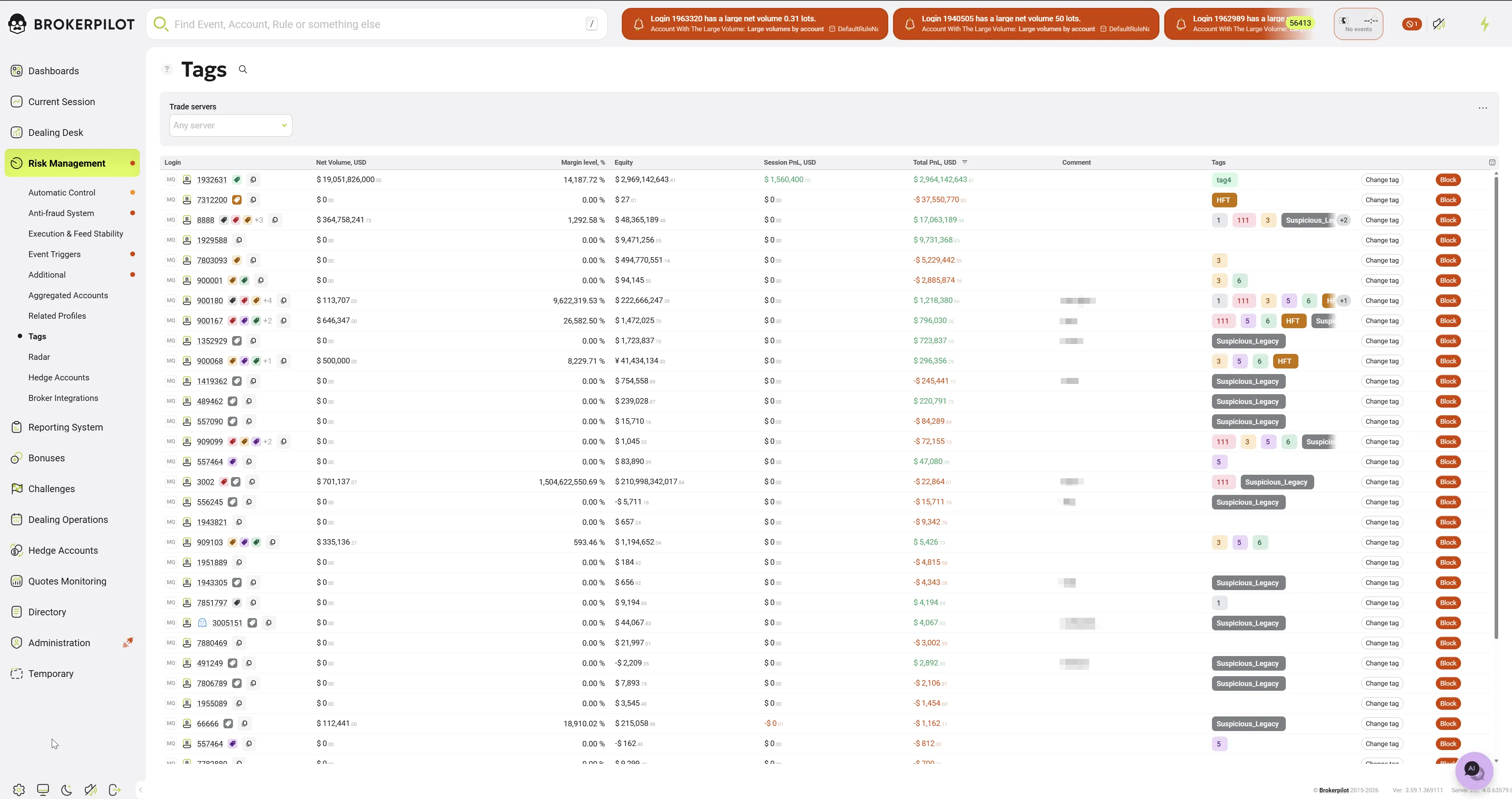
Unified Account Display: Overhauled account presentation across all system tables. The Login column now seamlessly integrates A/B/C Book badges, account colors, and tags. Hovering over an account now displays a tooltip with comprehensive additional information.

The new account element breaks down into the following components:
-
Platform Indicator: On the far left, there is an icon displaying the trading platform code (e.g., MQ for MetaQuotes, CT for cTrader). The color of this icon corresponds to the color assigned within the trading platform. If no specific color is designated, it defaults to a neutral grey.
-
Book Type: The next icon indicates the execution style (Book). The colors for these icons are strictly defined: an A (A-Book) is red, a B (B-Book) is green, and a C (C-Book) is purple.
-
Conditional Icons (left of the account number):
- Mini Account Icon: Represented by a lowercase 'm' (styled similarly to the book icon), this appears if the account is designated as a mini account.
- Exception Icon: Represented by a scissors symbol, this indicates that a specific exception condition is applied to the account.
-
Account Number & Entity Tooltip: The account number is the primary element, indicated by an underline. It is clickable: clicking on the number redirects you to the comprehensive Account Information Page. Additionally, hovering the cursor over the entire account entity (not just the account number) triggers a tooltip popup displaying key account metrics (such as Account group, Equity, Realized/Unrealized PnL, etc.).
-
Tags: To the right of the account number, up to three tags are displayed in the order they were assigned. If there are additional tags, an indicator shows the remaining quantity (e.g., +3).
-
Copy to Clipboard: At the end of the element block, there is an icon that allows you to quickly copy the full account number to your system clipboard.
-
-
Suspicious Accounts Migration: Successfully migrated the old "Suspicious" account state to the new tagging system. Accounts previously marked as suspicious have been assigned a 'Suspicious Legacy' tag, and their historical comments have been moved to the Comments tab within the account card and also to the Comment column in the newly updated Tags page.

-
Tags Page: The former "Suspicious" page has been renamed to "Tags". This change was made because the standalone "suspicious" account state no longer exists within the system. Now, this page serves as a centralized location where you can find all accounts marked with tags. Additionally, we implemented a new, optimized method for loading and displaying accounts on this newly renamed page.
Data Export Improvements
- Global Filter & Column Support: CSV exports across all pages now strictly respect user-applied filters, as well as custom column selections and ordering. If no custom filters are applied, a standard export is performed. The Export button will now automatically disable if there is no data available.
- Export from Drawer: Added a dedicated Export button directly inside the Semaphore events drawer.
Charts & Visualization
- Hedge Accounts PnL Chart Redesign: Reworked the PnL chart for hedge accounts to improve readability. The current PnL value on the right axis now uses contrasting colors. A second, clearly distinguishable line has been added to track Session Realized PnL. The chart is now fully adapted for the dark theme and includes a new legend.
Automated Notification Processing
-
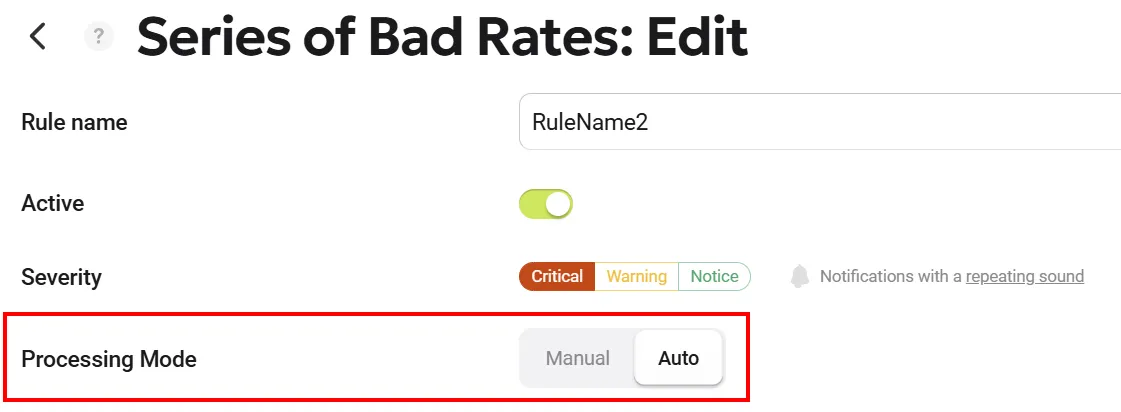
Automatic Notifications: Users now have the option to choose whether a triggered event requires manual confirmation (clicking the "Accept" button) or is purely informational in selected triggers. This enhancement reduces routine actions and allows operators to focus exclusively on critical events without the distraction of constantly clicking through informational notifications. You can still view automatically processed notifications on the Risk Management page by enabling the Only auto toggle, or in the top header by activating the Show automatic notifications toggle.
-
Added automated processing functionality to the settings of the following triggers:
- Change Spread by Period
- Series of Bad Rates
- Symbol Unusual PnL
- Abnormal Volatility
- Rates Gaps
- Spread Widening
- Failed Stop Outs
- Rejected Orders
- Overdue Credits
- Stealing Quotes
-
"Exclude Account" notifications and timer expiration events are now automatically marked as processed. They will be hidden from the main view if the "Hide processed" filter is active, while remaining available for audit purposes.
-
Group Names in Notifications: Group names in previews and notifications are now displayed in a concise format (showing only the last part of the path) with a quick-copy button. The full path is available via a hover tooltip.
📊 Tables & Interface Updates
- Smart Column Resizing: Improved column width adjustment logic to prevent users from accidentally collapsing columns to zero width. The Auto-Width feature now accurately calculates required space based on cell content.
- Default Sorting: Added default sorting indicators to interactive tables system-wide to improve data readability.
- New Columns: Added 'Currency' and 'Leverage' columns to the Directory > Accounts page.
- New Filters: Added an 'A/B/C Books' filter to the Current Session > Top Accounts Volumes page to match the filtering capabilities of other pages.
- Email Sender Upgrades: Improved the Email Sender window in the Dealing Operations section by fixing body text field resizing and enabling arrow-key navigation. Additionally, start date selection logic has been improved: if the current day is selected, the time defaults to the current UTC time.
⚙️ Triggers & Risk Management
- Mini Accounts Trigger: Fixed the auto-block trading feature. The system now reliably blocks trading upon trigger activation, regardless of whether there are open positions on the account.
- Affiliate Cheating Trigger: Introduced conflict validation to prevent contradictory setups between explicitly included accounts/symbols and grouped rules within the same trigger.
🐞 Bug Fixes
- Data & Display Fixes:
- Fixed an issue where MT4 platform accounts were missing from the Top Accounts Volumes page.
- Fixed a bug where the "Dealer Side" toggle was unresponsive and did not affect the Symbol PnL History chart.
- Resolved search discrepancies where results would inconsistently vary across different trading platforms.
- Removed a duplicate "Hide Processed" filter from the Risk Management page layout.
- Export Fixes:
- Fixed a trade history CSV export bug where only the first page of records was exported; the export now correctly compiles all pages/records.
- UI/UX Fixes:
- Fixed an issue in the Symbol Unusual PnL notification drawer: clicking an account login link to open in a new tab erroneously redirected to the Current Session page. It now correctly opens the account details in a modal window.
- Fixed an issue where the chatbot window could not be closed on smaller screens. Added dynamic resizing limits so the chat window scales appropriately with the parent window size.
- Improved the stability of Semaphore notifications after a connection drops, resolving an issue where the alert counter displayed incorrect values.
🛠 Technical & Backend Optimizations
- API Response Optimization: Refactored the
ResponseSentimentscontract for widgets. Endpoints now strictly return necessary data (Symbol, Buyers/Sellers Ratios, Volume in USD, etc.), significantly reducing payload size. Obsolete fields have been deprecated and replaced. - Database Refactoring: Refactored quote database schemas and indexes to eliminate duplicate indexes and reduce database bloat.
- Memory Management: Resolved a backend memory leak caused by incorrect issue processing logic.