November 28, 2026
Release version 3.68.0
🆕 New Features
Dealing Desk: Fully Withdrawn report
The Deposits & Withdrawals page in Dealing Desk has a new Fully Withdrawn tab. It lists every account whose total withdrawals equal or exceed its total deposits, so you can spot clients who are leaving the business.
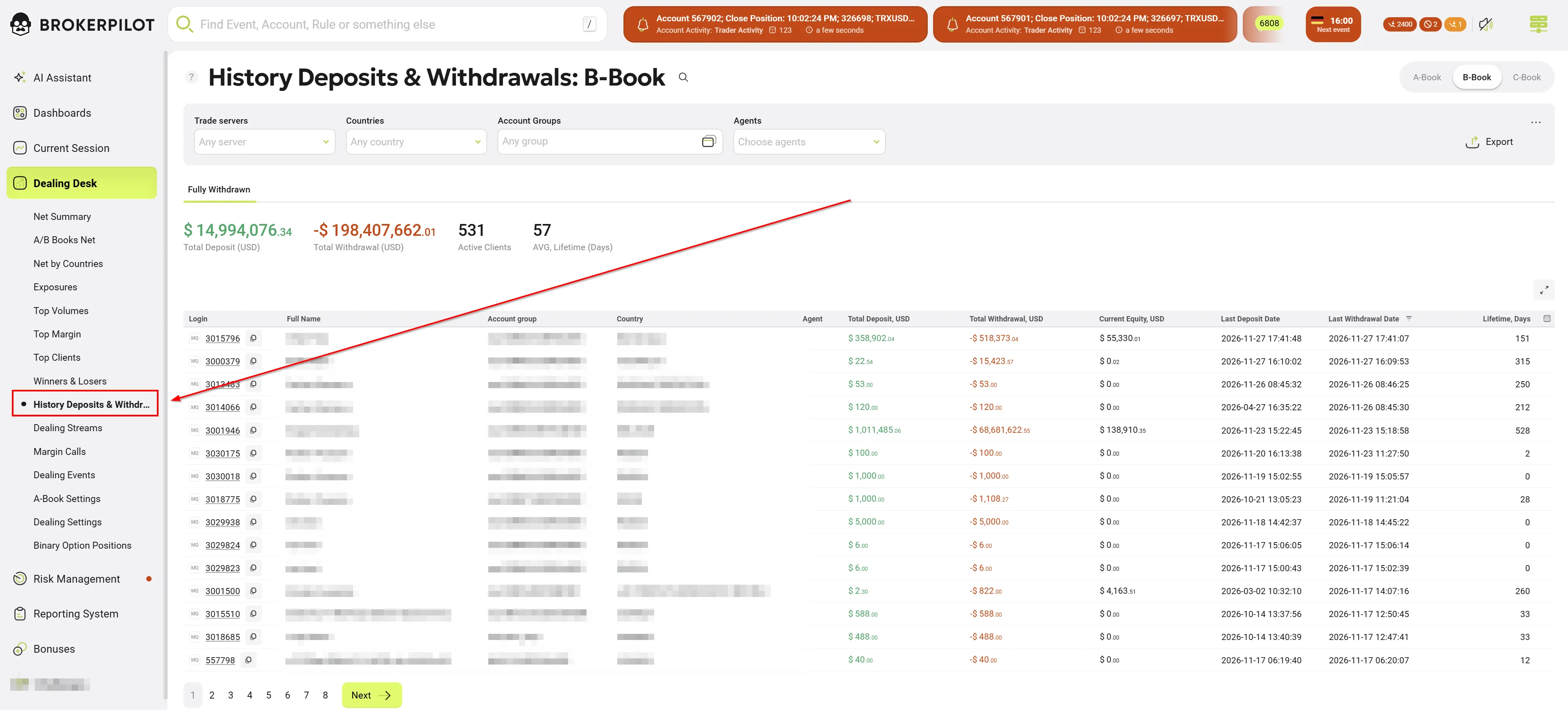
- Filters: Trade servers, Countries, Account groups and Agents. The A/B/C-Book switcher is also supported.
- Summary bar: Total Deposit, Total Withdrawal, number of clients and average client lifetime (days).
- Table columns: Login, Full Name, Group, Country, Agent, Total Deposit (USD), Total Withdrawal (USD), Current Equity (USD), Last Deposit Date, Last Withdrawal Date, Lifetime (days), and a quick link to the account profile.
- Export to file is available.
- Access is controlled by a dedicated user permission. The report is also available through API tokens, but it is not enabled by default for new API keys.
Detailed information is available on our dedicated page
Risk Management: notifications processing
Quick action buttons — Exclude account, Block trading, and Add tag — are now available across all account-processing triggers.
These actions are now supported for the following triggers that lacked them previously:
- Large Volumes by Order
- Large Volumes by Account
- Achieved Profit
- Trader Activity
- Agent Commissions
- Account Events
Additional improvements:
- Actions not supported by the trading platform or the Manager API connection are hidden automatically, so you no longer see buttons that would have no effect.
- Alerts that previously lacked action buttons (such as Net Dynamic Leverage and Snapshot Order Swaps) now display them.
- The Change leverage action on order leverage alerts now works as expected.
Markouts: cTrader support
Markout analytics now receives data from cTrader servers as well as the platforms already supported.
AI Assistant: markout data
The AI Assistant can now answer questions about markouts.
Redesigned sign-in screen
The sign-in page has a new look and uses separate artwork for the light and dark themes. The password rules hint on the Set password screen no longer covers the Enter button.
🔧 Improvements
- Date picker: you can now type a date directly into the field. The input mask follows your configured date format.
- Net Summary: three columns have been renamed for clarity:
- Volume, Lots → Net Volume, Lots
- Lots buy → Buy, Lots
- Lots sell → Sell, Lots
- Current Session: numbers are easier to read because decimal digits are no longer dimmed.
- PnL by Symbols widget: shows the top 15 symbols by default.
- Dashboards: the Account Groups selector in widget settings is a tree again (trade server → groups). This fixes widgets that showed $0.00 after a group was selected.
- Performance: the Dashboards page loads and responds faster and no longer freezes when it has many widgets.
- Performance (MT5): account statistics, session summary, symbol statistics and Winners/Losers are calculated faster on large servers.
- Markouts reliability: markout data is delivered more reliably, with automatic retries when the client server is temporarily unavailable.
🐞 Bug Fixes
Current Session
- Fixed an incorrect Open Time in Session Realized Positions for positions opened before the current session.
- Symbol PnL History: when several trade servers were selected, the chart could show an empty result. It now aggregates correctly.
- After you switch the Book (for example, from C-Book to B-Book), the Session PnL link on the Symbols tab now opens the history with the current Book and Dealer side.
Risk Management
- Large Volumes by Account: the Minimum volume in USD field accepted decimal values and silently rounded them on save. It now accepts whole numbers only.
- Exclude account with the duration Forever sometimes closed the dialog without applying the action. This is fixed.
- MT4 and MT5 plugin rules (for example, Net Dynamic Leverage) now receive exactly the groups selected in the rule. Folders include their subgroups, and newly created groups are picked up without re-saving the rule.
- Swap Free Accounts (MT4): fixed open positions being lost after rollover.
Platform & stability
- MT4 connections: fixed memory growth during the trading session that was proportional to the number of open positions.
- Event export: exporting server events no longer returns an empty archive when the export takes a long time.
- AI Assistant: fixed a "Request Header Or Cookie Too Large" error that could stop the assistant from loading for users with many permissions.
- Dividends: CSV import of dividend tasks now records the user who started it.
- High CPU Usage during Account Search: Resolved an issue causing excessive CPU consumption when searching for accounts in Libertex.
- Trading Session Summary Caching: Internal optimization allowing servers to reuse recently calculated trading session summaries for identical requests (data refreshes at least once per second).
- MT5 Trading Session Summary Calculation: Accelerated trading session summary generation by calculating account balance and credit totals on the fly instead of building a full list of accounts per request. This significantly reduces system load and update latency on servers with a large number of accounts, while keeping displayed metrics (account count, balances, credits, equity) unchanged.
- MT5 Current Session Performance: Improved overall performance of the Current Session feature in MT5.
- MT5 Blocked Accounts Counter: Fixed an issue where almost all accounts were mistakenly counted as blocked. Now, only accounts with trading disabled or set to read-only mode are included, ensuring the counter always matches the actual blocked accounts list.
- Memory Allocation & Bulk Database Operations: Optimized handling of large data volumes so that trading session summary calculations and bulk record saving run faster and consume noticeably less memory, with no changes to the structure or values of the returned data.