History Deposits & Withdrawals
1. History Deposits & Withdrawals
This page lists accounts whose clients have withdrawn at least as much money as they ever deposited. Dealers and risk managers can use it to answer questions such as:
- Which clients have already taken back all of their deposited money (or more)?
- How much was deposited and withdrawn in total by these clients?
- How long did these clients stay, from their first deposit to their last withdrawal?
- What equity do these accounts still hold today?
Menu path: Dealing Desk → History Deposits & Withdrawals
2. Page layout
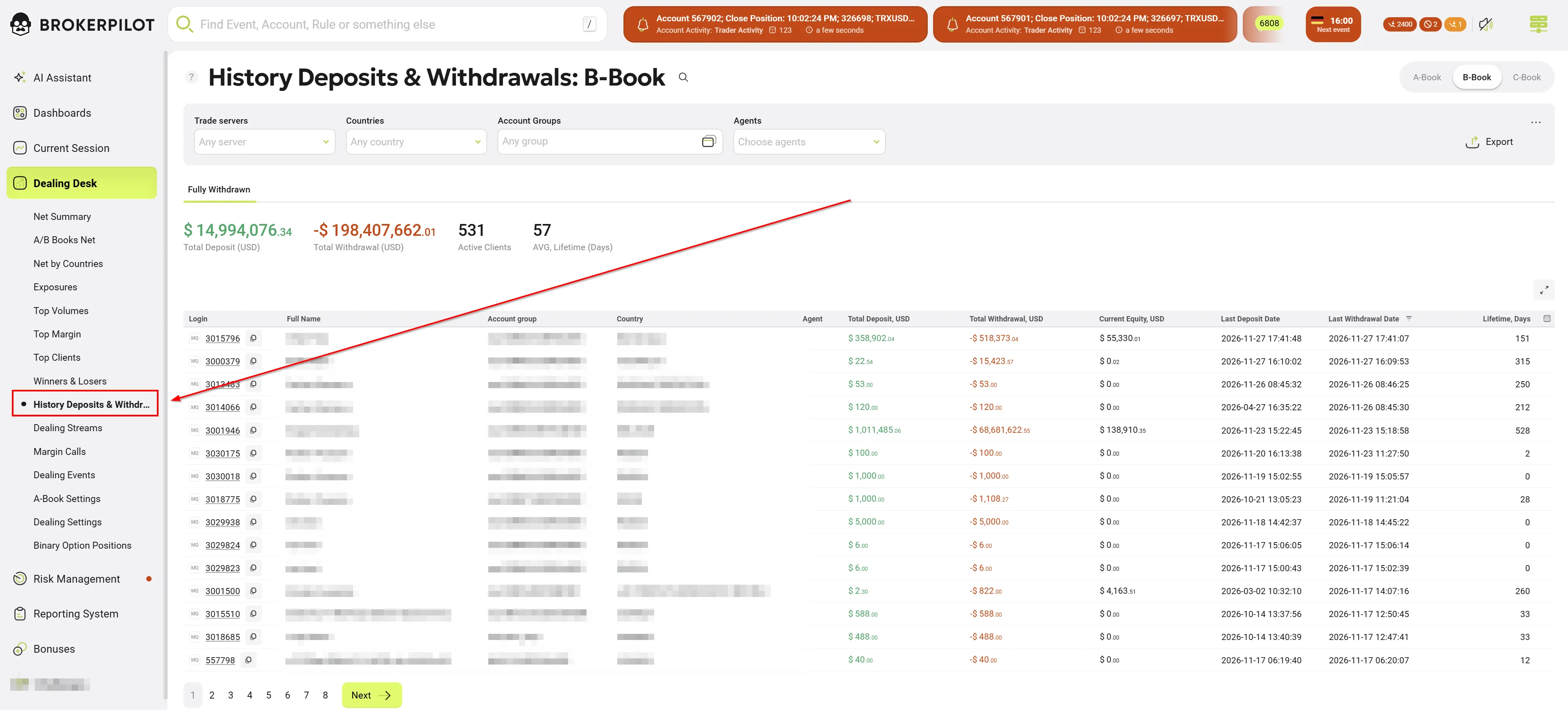
2.1 Heading and book switcher
- The heading shows the page name and the selected book, for example History Deposits & Withdrawals — C-Book.
- A help (?) icon links to the documentation for this page.
- The A / B / C switcher selects the book:
- A-Book: only accounts routed to A-Book.
- B-Book: only accounts kept in B-Book.
- C-Book (default): all accounts. No book restriction is applied.
2.2 Filters
| Filter | What it does |
|---|---|
| Filter templates | Save the current filter set and apply it again later. |
| Trade servers | Limits the report to the selected trade servers. If none is selected, all available servers are used. |
| Countries | Country from the trader profile. |
| Accounts | Selects account groups and accounts in a group tree. |
| Agents | The agent the account is attached to. |
| Book (hidden) | Not shown as a field; it is controlled by the A/B/C switcher. |
| Export CSV | Downloads the report (see section 6). |
When any filter changes, the table goes back to page 1.
2.3 Search
The search field is in the table toolbar. The search runs on the server. It matches the account login, full name, e-mail, comment and account group.
3. Summary bar
The summary bar shows totals for the whole filtered selection, not only for the current page. The values stay the same when you move between pages.
| Indicator | Meaning |
|---|---|
| Total Deposit (USD) | Sum of all client deposits of the listed accounts, in USD. Shown in green. |
| Total Withdrawal (USD) | Sum of all client withdrawals of the listed accounts, in USD. Shown as a negative (red) number because it is an outflow. |
| Active Clients | Number of listed accounts. Each (trade server, login) pair counts once. This is not a count of unique clients. |
| AVG, Lifetime (Days) | Average lifetime of the listed accounts, rounded to whole days. Accounts with an unknown lifetime are left out of the average. |
4. Table: Fully Withdrawn
4.1 Columns
| Column | Description | Sortable |
|---|---|---|
| Login | Account login. This column cannot be hidden. | Yes |
| Full Name | Name of the account owner. | Yes |
| Account Group | Account group on the trading platform. | Yes |
| Country | Country from the trader profile. | Yes |
| Agent | Agent number. Empty if the account has no agent. | Yes |
| Total Deposit, USD | Total of all client deposits made over the account's life. Shown in color. | Yes |
| Total Withdrawal, USD | Total of all client withdrawals made over the account's life. Shown as a negative number in color. | Yes |
| Current Equity, USD | Account equity right now, in USD. | Yes |
| Last Deposit Date | Date and time of the last client deposit. | Yes |
| Last Withdrawal Date | Date and time of the last client withdrawal. | Yes (default: newest first) |
| Lifetime, Days | Days between the first deposit and the last withdrawal. | Yes |
4.2 Table behaviour
- Default sort: Last Withdrawal Date, descending.
- Sorting: Click a column header to sort. The server sorts the whole selection, not only the visible page. Only one column is sorted at a time. Rows with equal values are ordered by trade server, then by login.
- Pagination: The server returns one page at a time. The default page size is 15 rows, and the maximum is 1000.
- Column settings: You can show, hide, reorder, pin and resize columns. These settings are saved for the user. Login is always visible.
- Full-screen mode: The expand button opens the table full screen. In this mode the toolbar also shows the Export button.
- Data freshness: Data is loaded each time the page is opened or a filter changes. Nothing is cached. If a client deposits again and is no longer fully withdrawn, the account disappears from the next result.
5. CSV export
- The Export CSV button is in the filters bar. It also appears in the table toolbar when the table is in full-screen mode.
- The button is disabled while the table is empty.
- The export contains every row that matches the current filters. It is not limited to the current page, and the table's current sort is not applied.
- Columns: The file contains the columns currently visible in the table, in the same order. Node (trade server) and Login are always added at the start. A login is unique only within one trade server, so without these two columns the rows could not be told apart.
- If the API is called without a column list, the file contains these 13 columns: Node, Login, Full Name, Group, Country, Agent, Total Deposit (USD), Total Withdrawal (USD), Current Equity (USD), First Deposit Date, Last Deposit Date, Last Withdrawal Date, Lifetime (Days).
- File format: a CSV file inside a ZIP archive, encoded as UTF-8 with BOM.The default delimiter is
;. - The UI names the downloaded file fully withdrawn accounts.
6. Logic description
6.1 When an account is "Fully Withdrawn"
An account is listed when both conditions are true:
Total Deposit (USD) > 0 AND Total Withdrawal (USD) >= Total Deposit (USD)
- If total withdrawals equal total deposits, the account is listed.
- An account with no deposits is never listed.
6.2 Which operations are counted
- Only client deposits and withdrawals (balance operations) are counted.
- Only real accounts are counted. Accounts in demo groups and other excluded dealing groups are left out.
- These operations are not counted in either total: swaps (overnight commissions), other commissions, bonuses, credits, dividends, corrections, agent commissions and internal transfers.
- For example, an account whose balance was reduced to zero by swaps alone is not listed.
- All amounts are converted to USD.
6.3 Lifetime
- Lifetime (days) = Last Withdrawal Date − First Deposit Date.
- Lifetime is never negative. Unusual histories are shown as 0.
- If either date is unknown, the lifetime is empty. The account is still listed but is left out of AVG, Lifetime (Days).
6.4 Current-session operations
The report combines the stored operation history with the operations of the current trading session. Today's deposits and withdrawals therefore affect the result right away:
- An account that became fully withdrawn through a withdrawal today appears immediately.
- An account that was topped up today disappears immediately.
6.5 Multiple trade servers
Each row is one (trade server, login) pair. Accounts with the same login on different trade servers are never merged.
If some trade servers do not respond, the page and the export still show data from the servers that did respond. The servers that failed are reported as errors, so you can tell the result is incomplete.
8. Platform support and limitations
| Platform | Support | Notes |
|---|---|---|
| MetaTrader 5, MetaTrader 4, cTrader | ✅ Full | History is stored on the trade server node at each rollover. |
| Libertex | ⚠️ Current session only | Balance-operation history is not saved to the database. The report sees only the current session's operations, plus any history loaded manually, so totals can be incomplete. |