Top Symbol Volumes
General Information
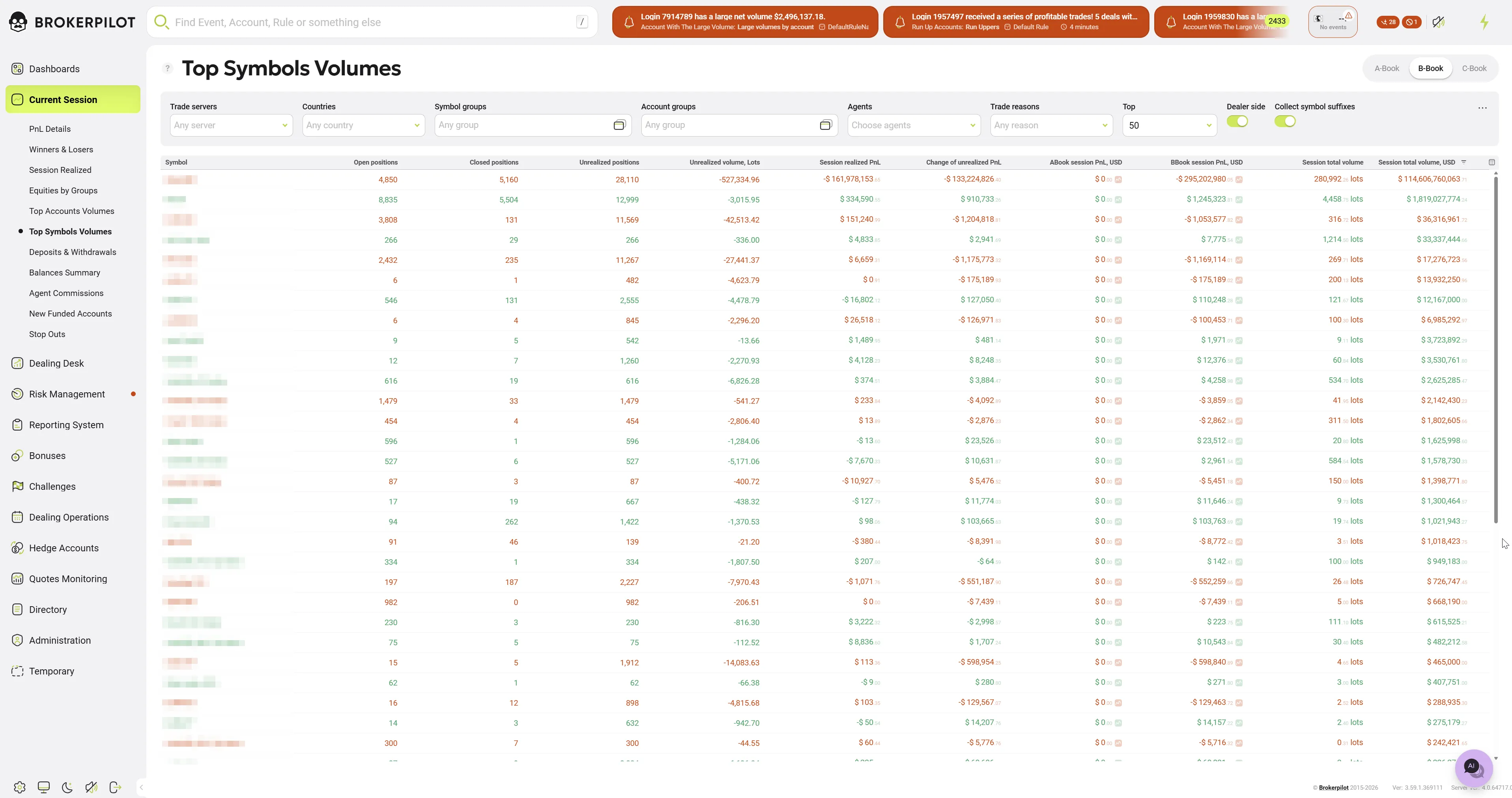
The Top Symbols Volumes page provides a comprehensive, real-time overview of trading activity categorized by financial instruments. It allows risk managers and dealers to monitor volumes, positions, and profitability across different symbols during the current trading session.
Book Selection (Top Right)
In the top right corner of the interface, there are toggle buttons to switch the view based on the routing model (Book). You can click these to filter the data accordingly:
- A-Book: Displays data strictly for trades that are routed to external liquidity providers.
- B-Book: Displays data for trades that are internalized (kept in-house by the broker).
- C-Book: Displays the aggregated data of both A-Book and B-Book combined.
Filters and Switches (Top Toolbar)
The top toolbar contains various dropdowns, input fields, and toggle switches to refine the data displayed in the table.
- Trade servers: Filters the data by specific trading platforms or servers (e.g., MT4, MT5).
- Countries: Filters the statistics based on the registered country of the clients.
- Symbol groups: Filters the instruments by their specific asset class or group (e.g., Forex, Metals, Indices).
- Account groups: Narrows down the data to specific client account groups configured on the server.
- Agents: Allows you to filter data based on specific Introducing Brokers (IBs) or agents.
- Trade reasons: Filters the data based on how the trade was executed (e.g., Client, Expert Advisor, Dealer).
- Top: A numeric input field that defines the number of top-performing symbols to display (e.g., entering "50" shows the top 50 symbols by volume).
- Dealer side: A toggle switch that, when activated, flips the perspective of the data to show metrics from the broker's (dealer's) point of view rather than the client's.
- Collect symbol suffixes: A toggle switch that aggregates data for the same root symbol by ignoring suffixes (e.g., combining data for
EURUSD,EURUSD.raw, andEURUSD.minto a singleEURUSDrow).
Table Columns
The main data table breaks down the session's trading metrics for each symbol.
- Symbol: The name of the trading instrument (e.g., EURUSD, GOLD).
- Open positions: The total number of trades that are currently open for this symbol.
- Closed positions: The total number of trades that have been closed during the current session.
- Unrealized positions: The current net number of open positions.
- Unrealized volume, Lots: The net open volume currently held by clients, measured in standard lots.
- Session realized PnL: The total Profit and Loss generated from trades closed during the current session.
- Change of unrealized PnL: The fluctuation in Profit and Loss for all currently open trades during the current session.
- ABook session PnL, USD: The session's Profit and Loss specifically attributed to A-Book (hedged) execution, calculated in USD.
- BBook session PnL, USD: The session's Profit and Loss specifically attributed to B-Book (internalized) execution, calculated in USD.
- Session total volume: The overall trading volume executed during the current session, measured in lots.
- Session total volume, USD: The overall trading volume executed during the current session, converted into its USD equivalent.