Swaps Free Accounts
General Information
This trigger is a powerful tool that allows brokers to offer swap-free trading conditions to their clients. Instead of completely removing swap charges, the trigger preserves the swap value from when the promotion started and prevents additional swap accumulation.
Key Benefits
- ✅ Flexible Promotions: Three operation modes for different business needs
- ✅ Fair Trading: Preserves existing swap history
- ✅ Automated: No manual intervention required
- ✅ Precise Control: Filter by accounts, symbols, position types, and volumes
- ✅ Sign-Agnostic: Works correctly with positive and negative swaps
Menu Navigation
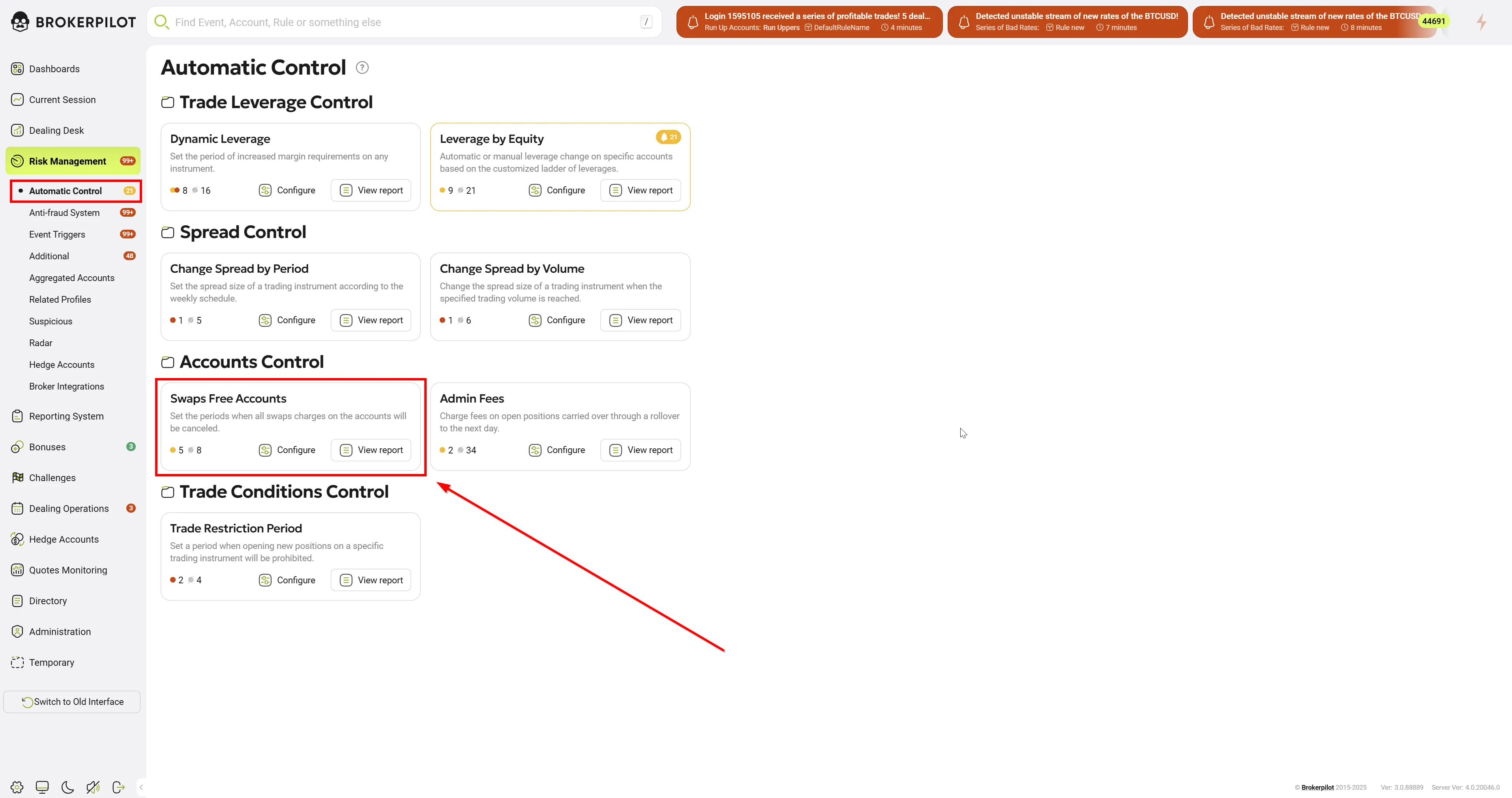
📌 You can find the Swaps Free Accounts trigger under:
Risk Management → Automatic Control
Edit Settings
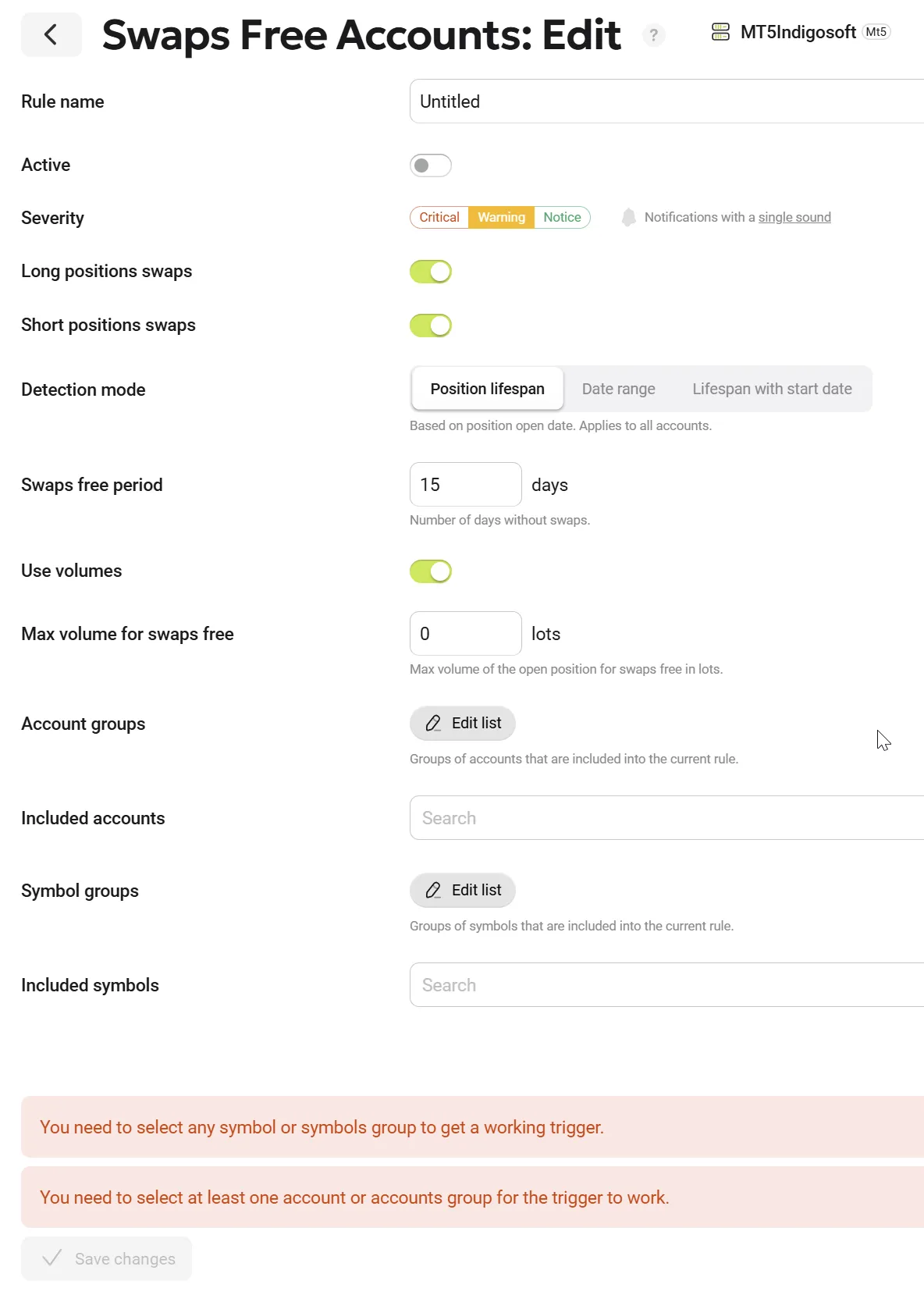
The table below lists all the settings available for configuring this rule:
| Parameter Name | Description |
|---|---|
| Rule Name | The name of the selected rule. |
| Long Positions Swaps | Indicates whether swaps are cleared for long positions. Enabled = cleared, disabled = not cleared. |
| Short Positions Swaps | Indicates whether swaps are cleared for short positions. Enabled = cleared, disabled = not cleared. |
| Use Volumes | Enable volume-based calculation. |
| Max Volume for Swaps Free, Lots | Set the maximum volume (in lots) of one position to be eligible for swaps-free trading. |
| Account Groups | Specify the account groups to be monitored. |
| Included Accounts | Select individual accounts for monitoring. |
| Symbol Groups | Choose which symbol groups should be monitored. |
| Included Symbols | Select specific symbols to be monitored. |
Quick Start
Step 1: Enable the Trigger
- Navigate to Risk Management → Automatic Control → Swaps Free Accounts
- Click "Add Rule"
- Enter rule name (e.g., "January Promotion")
Step 2: Choose Operation Mode
Select one of three modes:
- Position Life Span - Each position gets N days swap-free from opening
- Date Range - All positions swap-free during specific calendar period
- Lifespan with Start Date - Hybrid mode that combines Date Range start with Position Lifespan logic
Step 3: Configure Filters
- ✅ Position Types: Long, Short, or both
- ✅ Accounts: Specific accounts or account groups
- ✅ Symbols: Specific symbols or symbol groups
- ✅ Volume Limits (optional): Max volume per position
Step 4: Save and Enable
- Click "Save"
- Toggle "Active" switch to activate the trigger
- The system will automatically process existing and new positions
Operation Modes
Mode 1: Position Life Span (Individual Period)

Description: Each position gets a fixed number of swap-free days starting from its open time.
When to Use:
- Standard swap-free accounts
- Individual position promotions
- No specific calendar period required
Configuration:
| Parameter | Value | Description |
|---|---|---|
| Mode Logic | Position Life Span | Select this mode |
| Swaps free period, days | 15 | Number of swap-free days per position |
| Long / Short | ✅ / ✅ | Position types to include |
Timeline Example:
Position Opened: January 1
Day 1-15: Swap-Free ✅
Day 16+: Normal Swaps ❌
Example: "Every position gets 15 days swap-free from opening"
Mode 2: Date Range (Fixed Calendar Period)
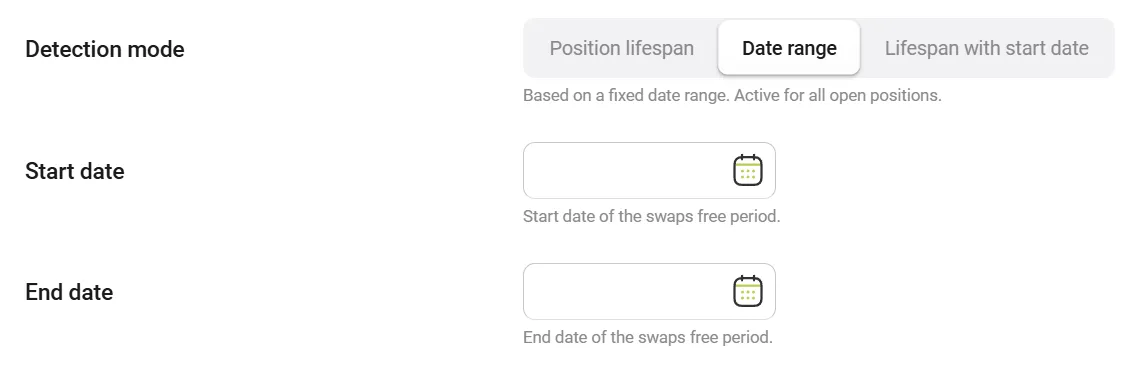
Description: All positions are swap-free within a specific calendar period, regardless of when they were opened.
When to Use:
- Promotional campaigns with fixed dates
- Holiday promotions
- Special trading events
Configuration:
| Parameter | Value | Description |
|---|---|---|
| Mode Logic | Date Range | Select this mode |
| Start Date | 2025-01-01 | Campaign start date |
| End Date | 2025-01-31 | Campaign end date |
| Swaps free period, days | (auto) | Automatically calculated |
Timeline Example:
December 31: Normal Swaps ❌
January 1-31: Swap-Free ✅
February 1: Normal Swaps ❌
Mode 3: Lifespan with Start Date
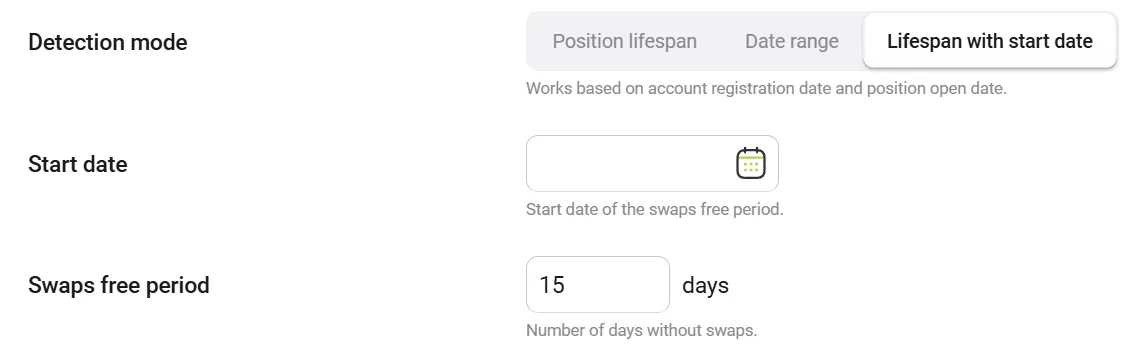
Description: Hybrid mode that combines Date Range start with Position Lifespan logic. Old positions (opened before rule activation) get swap-free period from Start Date, while new positions (opened after rule activation) get period from their open time.
When to Use:
- Rules activated for existing positions (old positions get period from activation date)
- Mixed scenarios with both old and new positions
- Need different logic for positions opened before vs after rule activation
Configuration:
| Parameter | Value | Description |
|---|---|---|
| Mode Logic | Lifespan with Start Date | Select this mode |
| Start Date | 2025-01-01 | Rule activation date (required) |
| Days Of Order Free Swap | 7 | Number of swap-free days |
| Long / Short | ✅ / ✅ | Position types to include |
Account Filter: None (all accounts are processed, registration date filtering is disabled)
Position Period Logic:
- Old positions (opened BEFORE Start Date): Period counted from Start Date
- New positions (opened ON or AFTER Start Date): Period counted from position open time
Timeline Example - Old Position:
Position Opened: December 20, 2024
Rule Activated (Start Date): January 1, 2025
Days Of Order Free Swap: 7

Period counted from Start Date:
Day 1-7 (Jan 1-7): Swap-Free ✅
Day 8+ (Jan 8+): Normal Swaps ❌
Timeline Example - New Position:
Rule Activated (Start Date): January 1, 2025
Position Opened: January 5, 2025
Days Of Order Free Swap: 7

Period counted from open time:
Day 1-7 (Jan 5-11): Swap-Free ✅
Day 8+ (Jan 12+): Normal Swaps ❌
Example: "Old positions get 7 days swap-free from rule activation (Jan 1st), new positions get 7 days from opening"
Use Cases
Use Case 1: Standard Swap-Free Accounts
Goal: Offer Islamic/swap-free accounts with 15 days swap-free per position
Configuration:
Mode: Position Life Span
Days: 15
Accounts: [Islamic Accounts Group]
Symbols: All
Long/Short: Both
Result: Every position opened by Islamic account holders gets 15 days swap-free from opening.
Use Case 2: January Promotion for All Clients
Goal: Make all positions swap-free during January as a New Year promotion
Configuration:
Mode: Date Range
Start Date: 2025-01-01
End Date: 2025-01-31
Accounts: All
Symbols: All
Long/Short: Both
Result: All positions (existing and new) are swap-free from January 1st to January 31st.
Use Case 3: Forex Majors Promotion (15-30 August)
Goal: Swap-free trading on major forex pairs for 2 weeks
Configuration:
Mode: Date Range
Start Date: 2025-08-15
End Date: 2025-08-30
Symbol Groups: [Forex Majors]
Long/Short: Both
Result: All positions on EURUSD, GBPUSD, etc. are swap-free from August 15-30.
Use Case 4: High Volume Traders Only
Goal: Offer swap-free to traders with positions ≤ 10 lots
Configuration:
Mode: Position Life Span
Days: 15
Use Swaps Free Volumes: Yes
Max Swaps Free Volume: 10
Long/Short: Both
Result: Only positions with volume ≤ 10 lots get swap-free treatment.
Configuration Guide
Basic Settings
1. Rule Name
- Purpose: Identify the rule
- Example: "January 2025 Promotion", "Islamic Accounts", "New Traders"
- Best Practice: Use descriptive names with dates
2. Enabled
- Active ON: Rule is active and processing orders
- Active OFF: Rule is disabled (no processing)
- Note: When enabling, the system creates snapshots for all existing positions
3. Mode Logic
- Position Life Span: Individual period per position
- Date Range: Fixed calendar period
- New Accounts Only: New clients + individual period
Period Settings
4. Swaps free period, days
- Range: 1 to 999 days
- Note: Ignored if End Date is set (auto-calculated)
- Example: 15 = fifteen days swap-free
5. Start Date
- Required for: Date Range, Lifespan with Start Date modes
- Format: YYYY-MM-DD
- Example: 2025-01-01
6. End Date (Optional)
- Purpose: Define exact calendar period
- Note: If set, Days is auto-calculated
- Example: 2025-01-31
- UI: Calendar picker (select start and end dates visually)
Position Type Filters
7. Long Positions
- ☑️ Include long (Buy) positions
- ☐ Exclude long positions
8. Short Positions
- ☑️ Include short (Sell) positions
- ☐ Exclude short positions
Note: At least one must be checked (Long or Short)
Volume Limits (Optional)
13. Use Volumes
- ☑️ Enable volume limit
- ☐ Disable (no limit)
14. Max Swaps Free Volume In Lots
- Range: 0.01 to 9999
- Example: 10.00 = positions ≤ 10 lots are eligible
- Note: Only used if "Use Swaps Free Volumes" is enabled
How Base Swaps Work
Understanding the Mechanism
Key Concept: The system does NOT set swaps to zero. Instead, it captures a "snapshot" of current swaps and keeps them at that value.
Step-by-Step Example
Scenario: January Promotion (Mode 2)
Timeline:
| Date | Event | Swaps | Action |
|---|---|---|---|
| Dec 25 | Position opened | 0 | Normal |
| Dec 26 | Rollover | -10 | Normal accrual |
| Dec 27 | Rollover | -20 | Normal accrual |
| Dec 28 | Rollover | -30 | Normal accrual |
| Jan 1 | Rule enabled | -30 | 📸 Snapshot created (Base = -30) |
| Jan 2 | Rollover | -30 → -40 | ✅ Reset to -30 (base value) |
| Jan 3 | Rollover | -30 → -40 | ✅ Reset to -30 (base value) |
| Jan 31 | Rollover | -30 → -40 | ✅ Reset to -30 (base value) |
| Feb 1 | Rule expired | -30 → -40 | ❌ Normal accrual resumes |
Result: Client kept -30 swaps (from before promotion), but no additional swaps accrued during January.
Why Not Zero?
Bad Approach ❌: Set swaps to 0
- Problem: Erases swap history before promotion
- Unfair: Client loses existing swap balance
Good Approach ✅: Set swaps to base value (snapshot)
- Benefit: Preserves swap history
- Fair: Client keeps pre-promotion swaps, but no new swaps accrue
- Accurate: Broker knows exact swap savings for client
Handling Positive Swaps
Scenario: Some instruments have positive swaps (client earns interest)
| Date | Event | Swaps | Action |
|---|---|---|---|
| Dec 28 | Position opened | 0 | Normal |
| Dec 29 | Rollover | +10 | Positive swap earned |
| Jan 1 | Rule enabled | +10 | 📸 Snapshot (Base = +10) |
| Jan 2 | Rollover | +10 → +20 | ✅ Reset to +10 (prevent extra earnings) |
Result: Client keeps +10 (earned before promotion), but doesn't earn more during swap-free period.
Sign Changes (Rare but Possible)
Scenario: Interest rates change, causing swap sign flip
| Date | Event | Swaps | Base | Action |
|---|---|---|---|---|
| Jan 1 | Rule enabled | +50 | +50 | 📸 Snapshot |
| Jan 10 | Interest rate change | +50 → -30 | +50 | ✅ Reset to +50 |
| Jan 15 | Rollover | +50 → +60 | +50 | ✅ Reset to +50 |
Result: Base value remains stable (+50) regardless of sign changes.
Best Practices
1. Test Before Production
Recommendation: Create test rule on demo/test environment first
Steps:
- Create rule with same configuration
- Test with 1-2 accounts
- Verify snapshots are created correctly
- Check swap resets work as expected
- Monitor for 2-3 days
- Deploy to production
2. Clear Communication
Inform Clients:
- ✅ Swap-free period dates
- ✅ Which instruments are included
- ✅ How existing swaps are handled
- ✅ What happens after promotion ends
Example Email:
"Dear Trader,
During January 2025, all positions on Forex Majors will be swap-free. Your existing swap balance will be preserved, and no additional swaps will be charged during the promotion period.
Promotion Period: January 1-31, 2025 Eligible Instruments: EURUSD, GBPUSD, USDJPY, AUDUSD
After January 31st, normal swap charges will resume."
3. Monitor Rule Performance
What to Check:
- Number of positions processed
- Number of snapshots created
- Number of swap resets per day
- Any error logs
4. Plan for Rule Expiration
Options:
- Disable rule: Swap accrual resumes normally
- Extend period: Update End Date or Days
- Create new rule: For different period or conditions
Best Practice: Disable rule 1 day after intended end date to ensure all positions are processed.
5. Use Specific Filters
Instead of: All accounts, all symbols
Use: Targeted groups
Benefits:
- Better performance
- Clearer reporting
- Easier troubleshooting
Example:
❌ Bad: Accounts = All, Symbols = All
✅ Good: Account Groups = [VIP], Symbol Groups = [Forex]
6. Volume Limits for Risk Control
Use Case: Prevent abuse of swap-free for large positions
Configuration:
Use Swaps Free Volumes: Yes
Max Volume: 10 lots
Result: Only retail-sized positions get swap-free, protecting broker from large swap-free positions.
FAQ
Q1: What happens to existing positions when I enable the rule?
A: The system automatically creates snapshots for all eligible open positions. Their current swap value becomes the "base value" and swaps will be reset to this value on each rollover.
Q2: Do swaps go to zero during the swap-free period?
A: No. Swaps are reset to the "base value" (snapshot), which is the swap value when the rule was enabled. This preserves swap history.
Q3: What happens when the swap-free period expires?
A: Normal swap accrual resumes. The system stops resetting swaps to the base value, and new swaps accumulate normally.
Q4: Can I change the period while the rule is active?
A: Yes. Update the Days, Start Date, or End Date and save. The system will recalculate eligibility on the next rollover. However, existing snapshots are not updated.
Q5: What happens if I disable and re-enable the rule?
A: Existing snapshots remain valid. The system will use the first snapshot created for each position. If you want to create new snapshots, you need to manually clear old snapshots first (contact technical support).
Q6: Can one position match multiple rules?
A: Yes, but only the first matching rule is applied. Rules are processed in the order they appear in the list.
Q7: Do snapshots work with positive swaps?
A: Yes. The logic is "sign-agnostic" and works correctly with positive, negative, and zero swaps.
Q8: What if a position was opened before the promotion started?
A: Mode 1 (Position Life Span): Position gets N days from its open time (may extend beyond promotion period).
Mode 2 (Date Range): Position is swap-free during the calendar period, regardless of open time.
Mode 3 (Lifespan with Start Date): Position gets N days from Start Date.
Q9: Can I exclude specific accounts from the promotion?
A: Yes, use the "Exclude" option in Accounts or Account Groups filters.
Q10: How do I troubleshoot if swaps are not being reset?
- Check if rule is enabled
- Verify position matches all filters (account, symbol, position type, volume)
- Check if position is within swap-free period
- Enable detailed logging and review logs
- Verify snapshot issue was created for the position
Troubleshooting
Problem: Swaps Not Being Reset
Symptoms: Position continues to accumulate swaps
Checklist:
- ☐ Rule is enabled
- ☐ Account is in included accounts/groups (or not in excluded)
- ☐ Symbol is in included symbols/groups (or not in excluded)
- ☐ Position type matches (Long/Short)
- ☐ Position is within swap-free period
- ☐ Volume is within limits (if
Use Volumesis enabled)
Problem: Snapshot Not Created
Symptoms: No snapshot issue found for position
Possible Causes:
- Position has zero swaps (filtered by system)
- Rule was disabled when position was processed
- Position doesn't match filters
Solution:
- Manually trigger processing: Disable and re-enable rule
- Check if position swaps are non-zero
- Verify filters are not too restrictive
Problem: Rule Affects Wrong Positions
Symptoms: Positions that shouldn't be swap-free are being processed
Checklist:
- ☐ Review account filters (Include vs Exclude)
- ☐ Review symbol filters (Include vs Exclude)
- ☐ Check if multiple rules are active
- ☐ Verify position type filters (Long/Short)
Solution: Review and adjust filters, disable conflicting rules
Problem: Wrong Number of Days
Symptoms: Period is too short or too long
Problem: Performance Issues
Symptoms: System slowdown after enabling rule
Possible Causes:
- Too many open positions
- Rule processes all accounts/symbols (no filters)
- Multiple rules with overlapping criteria
Solution:
- Add specific filters (accounts, symbols groups)
- Disable unused rules
- Monitor system resources
- Contact support if issue persists
Permissions
| MT4 | MT5 |
|---|---|
| Not applicable | 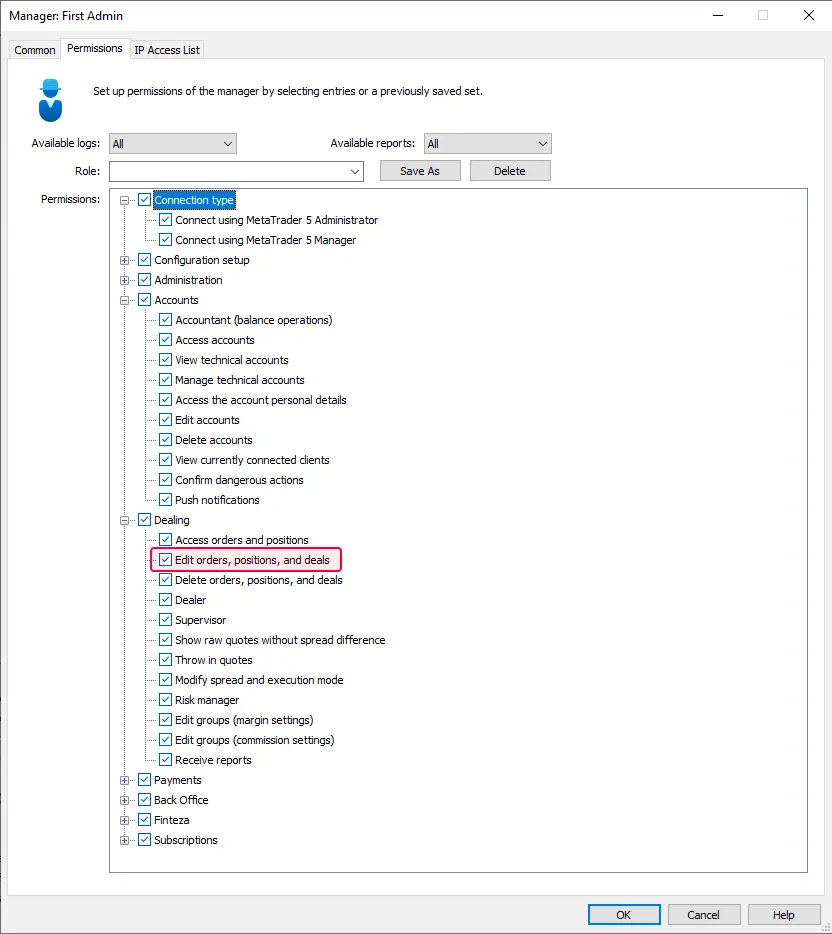 |