Net Dynamic Leverage
Overview
The Net Dynamic Leverage plugin is designed to automatically increase margin requirements during important macroeconomic events and news releases (the High Margin Requirement or HMR period). This helps brokers protect against client fraud (e.g., abuse of negative balance protection) during high market volatility without affecting positions opened before the HMR period activation.
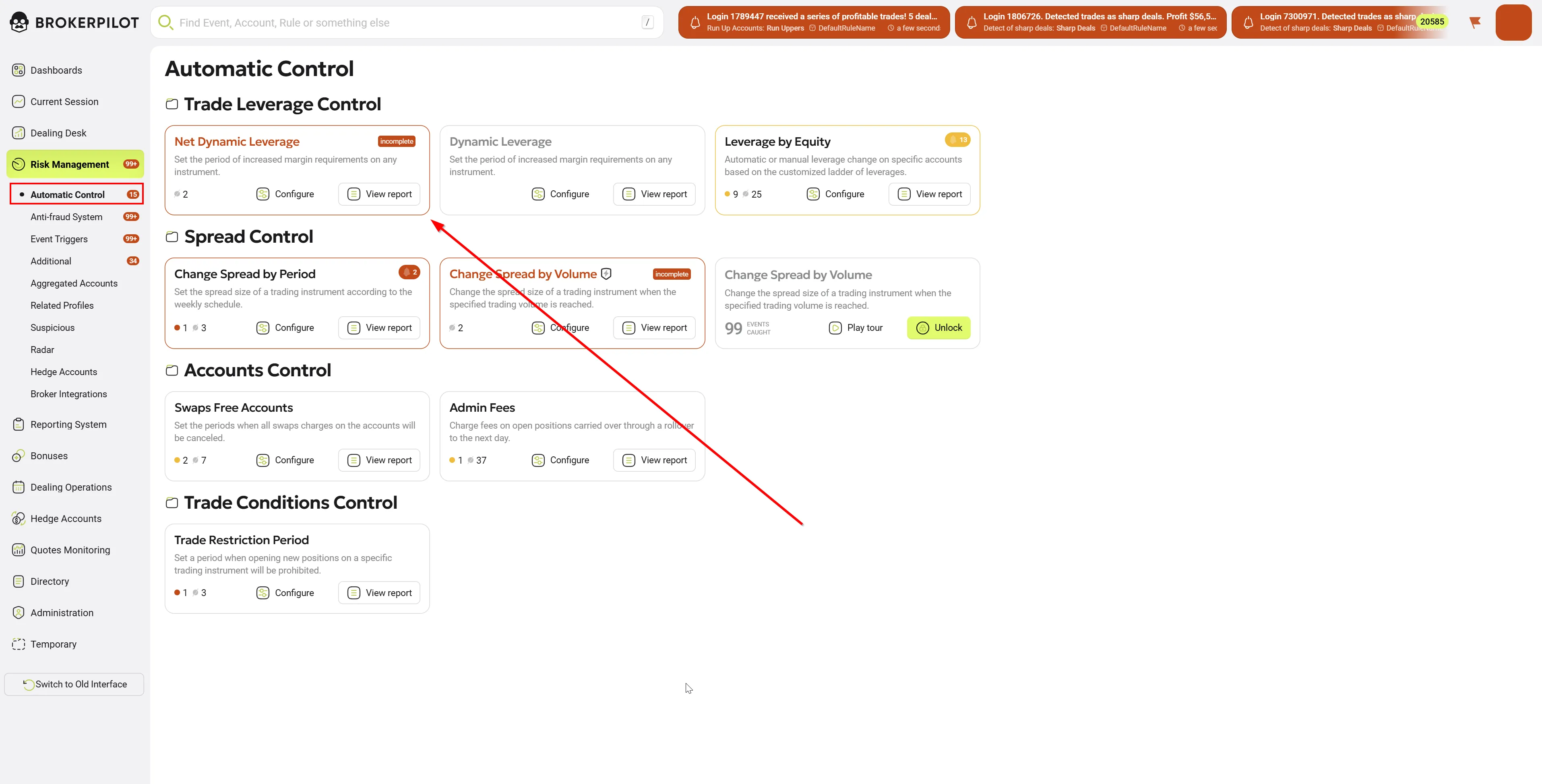
Key Features:
- Web Interface for Configuration and Control (Brokerpilot) – The plugin can be configured through a web interface where you can also control its operation: enabling/disabling, modifying rules/thresholds/time intervals, monitoring account events
- Fraud Protection – Increased margin requirements only for new positions opened during the HMR period
- Optional Old Position Handling – Rules can be configured to either account for positions opened before HMR or exclude them from calculations and only count new volume opened inside HMR (exception: lock unwinding)
- Time Periods – Precise HMR interval settings (day of week + start/end time, intraday intervals)
- Multi-tier Rules – Different leverage thresholds based on position volume (e.g., 0-5 lots: 1:200, 5-10 lots: 1:100)
- Support for Different Account Modes:
- MT4: Hedging mode (each trade = separate order)
- MT5: Netting and Hedging modes
- Smart Lock Handling – Flexible handling of hedged volume, including partial lock unwinding
- New Net Volume Inside HMR – Ability to work only with new volume opened inside HMR with any configuration of previously opened positions
- Optional Account Group Customization Processing – When enabled, the plugin takes into account symbol settings at the account group rules level, allowing different base margins/settings for different account groups
- Optional Issues Sending to Brokerpilot UI – Option to send margin change events for display in UI (account card)
- Account Leverage Change Adaptation – Automatically tracks account leverage changes and recalculates margin coefficients to keep monetary margin unchanged
- Optional HMR Leverage Limiting by Account Leverage – If the rule specifies leverage higher than the current account leverage, the plugin limits HMR leverage to account leverage. Only applies in "through leverage" calculation mode (not in percentage mode)
- Leverage Change for Fixed Leverage Symbols – Plugin allows changing margin requirements for symbols with fixed leverage (e.g., CFD)
- Tiered margin calculation mode – Configurable strategies for calculating volume-based tier "ladder":
- Standard (standard mode) - Plugin first selects one tier by
effectiveLotsvalue, then applies parameters of that tier to entire volume at once. In other words: "entire volume is calculated by one level". - Layered (layered mode) - Plugin divides volume into parts by tier ranges (segments). For each segment applies parameters of its tier, and the result is summed. In other words: "first N lots — by one level, next ones — by next level, etc."
- Standard (standard mode) - Plugin first selects one tier by
Platform Version Features
MT4 Version
- Hedging mode: each position = separate order (not aggregated like in MT5)
- State storage:
Mt4_BPNetLeveragesIssues.jsonfile in plugins folder for recovery after restart - Application to orders: plugin works with individual orders (tickets)
MT5 Version
- Netting and Hedging modes: support for both account modes
- State storage: ApiData (server memory)
- Application to positions: plugin works with aggregated positions
Plugin Deployment and Configuration on Trading Server
1. Deployment
For MT4:
- Copy
BrokerpilotNetLeveragesMt4.dllfile to MT4 trading serverPluginsfolder - Restart MT4 server/service (or perform plugin reload procedure)
For MT5:
- Copy
BrokerpilotNetLeveragesMt5.dllfile to MT5 trading serverPluginsfolder - Restart MT5 server (or perform plugin reload procedure)
2. Enabling and Configuration in Administrator Console
- Open MT4/MT5 Administrator console → Plugins section
- Add/enable Net Dynamic Leverage plugin
- ⚠️ MANDATORY: Ensure the plugin is one of the first in the plugin list. Plugin execution order is critical for proper operation, as the plugin must process margin changes before other plugins
- Configure plugin parameters in administrator console UI (parameter list provided below)
- Apply changes
MT5: See official MetaQuotes instruction
⚠️ IMPORTANT WARNING: We do not guarantee proper plugin operation when third-party developer plugins that change account leverage or margin on open positions are installed on the server. Such plugins may conflict with Net Dynamic Leverage logic and lead to incorrect margin calculations.
Plugin Parameters (Global Settings)
Common Parameters for MT4 and MT5
| Parameter Name in UI | Type | Default | Description |
|---|---|---|---|
| Send Issues | bool | true | Enables sending Issues (margin/leverage change events on positions) to Brokerpilot system for UI display (account card). MT4: additionally maintains Mt4_BPNetLeveragesIssues.json file. MT5: state is saved in ApiData (server memory). |
| Use debug logs | bool | false | Enables detailed logging of all plugin operations for diagnostics and debugging. ⚠️ Attention: creates large volume of logs, use only for troubleshooting. |
| Check Account (0 = log all accounts) | int | 0 | Logging filter: 0 = log all accounts, N = log only account with Login=N. Useful for debugging specific account. |
MT5-Only Parameters
| Parameter Name in UI | Type | Default | Description |
|---|---|---|---|
| Apply account group margin rules | bool | false | Consider account group customization rules for trading instruments. Allows different base margins/settings for different account groups. |
📝 Note for MT4: "Apply account group margin rules" parameter in MT4 is configured at rule level (see "Rule Parameters" section below).
Editing Rule Settings
Rules are created and edited in Brokerpilot web interface.
The plugin on the trading server stores its copy of the current rule configuration (periods, filters, thresholds) and applies it to trading events.
Rule Priority and Overlaps
Rules can overlap and conflict on:
- Account Groups - one group can be included in multiple rules
- Symbols - one symbol can be in multiple rules
- Time Ranges - HMR periods can overlap each other
When overlapping:
- ✅ No error - plugin continues to work
- ⚠️ Warning will be logged
- 🔝 Rule priority: top to bottom as they are arranged in Brokerpilot UI
Important: If account/symbol/time falls under multiple rules simultaneously, the first (topmost) rule in the list is applied.
Practical application:
This allows you to configure a general protection rule for the entire period, and then add higher-priority rules for specific news with stricter requirements.
Main Rule Parameters
| Parameter Name in UI | Applicability | Description |
|---|---|---|
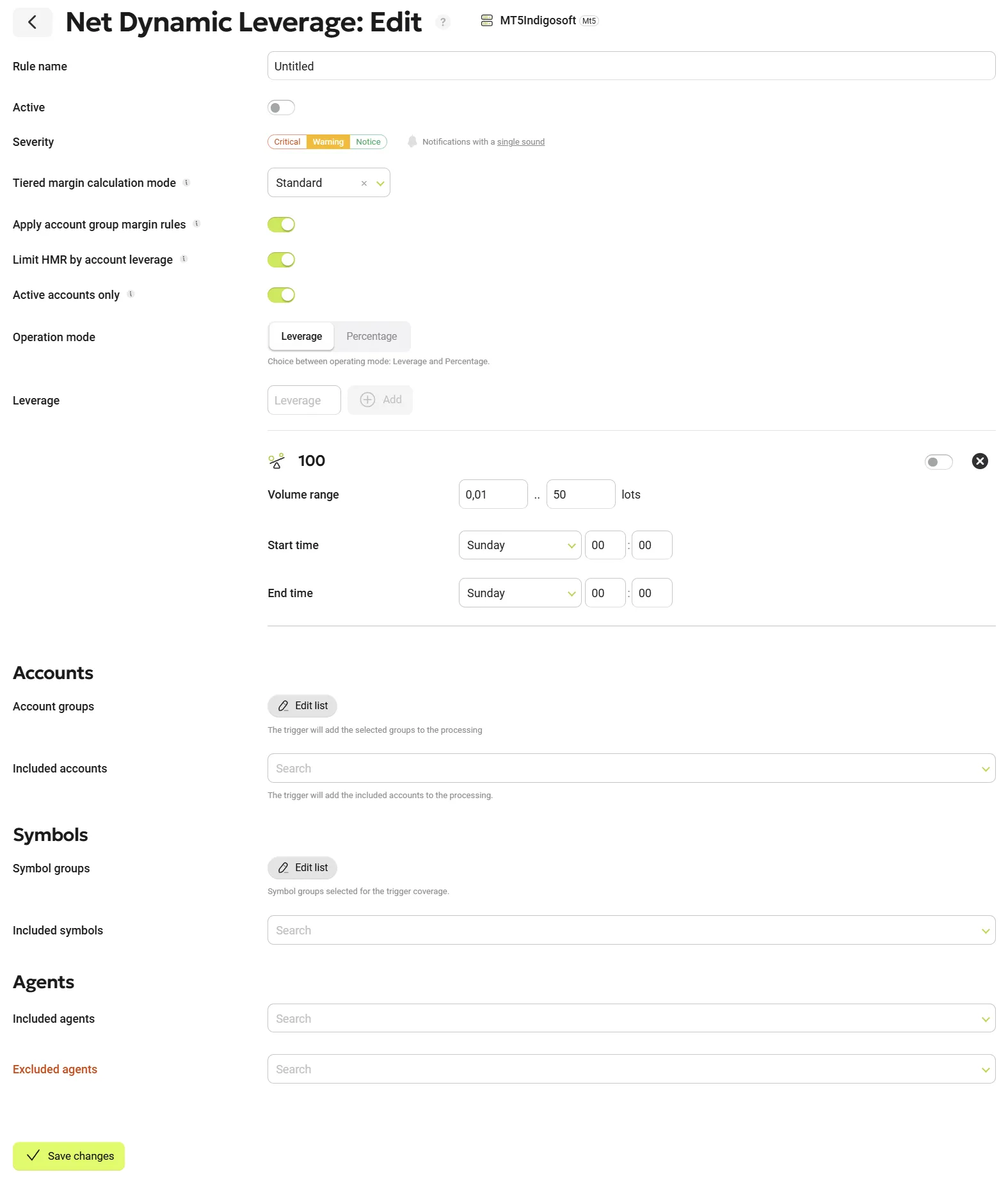
| Rule name | MT4, MT5 | Unique name for the rule (e.g., "NFP Friday", "ECB News", "Weekend Protection"). |
| Active | MT4, MT5 | Enable or disable the rule. Disabled rules are not applied to positions. ⚠️ Important: If all tiers in the rule are disabled, the rule cannot be activated as it will not work. At least one tier must be enabled. |
| Tiered margin calculation mode | MT4, MT5 | Tiered margin calculation mode: "Standard" (standard - one tier for entire volume) or "Layered" (layered - marginally by segments). Default: Standard. |
| Apply account group margin rules | MT4 | (MT4 only) Consider account group customization rules. Default: true. |
| Limit HMR by account leverage | MT4, MT5 | Limits HMR leverage by current account leverage. Default: false. Only applies in "Leverage" mode (not in percentage mode). Critical for compatibility with "Leverage by Equity" plugin. |
| Active accounts only | MT4, MT5 | Recommended: Enabled. If enabled, rule applies only to new positions opened inside HMR period. Old positions (opened before HMR) are not included in calculation. |
| Accounts Groups | MT4, MT5 | Specify account groups for rule application. You can include or exclude specific groups. |
| Accounts | MT4, MT5 | Select individual accounts for rule application. Both included and excluded accounts can be specified. |
| Agents | MT4, MT5 | Select agents (IB — Introducing Broker) for rule application. IB attracts clients and receives commission. You can filter accounts by IB membership or exclude them. |
| Symbols Groups | MT4, MT5 | Specify instrument groups (e.g., "Forex", "Metals", "Crypto CFD") for rule application. |
| Symbols | MT4, MT5 | Select specific instruments (e.g., "EURUSD", "XAUUSD") for rule application. |
| Operation mode | MT4, MT5 | Method of specifying HMR leverage: "Leverage" — sets specific target leverage value (e.g., 200 for 1:200) or "Percentage" — sets percentage of current account leverage (e.g., 50 means 50% of current leverage, i.e., 2x reduction). |
| Leverage tiers / Percentage tiers | MT4, MT5 | Configure volume ranges and corresponding leverage/percentage values. Each tier represents one step in "leverage ladder". |
Configuring Tiers
Each tier defines leverage based on Net Volume range (net position volume):
| Parameter | Description |
|---|---|
| Lots from | Lower bound of Net Volume range in lots (inclusive). |
| Lots to | Upper bound of Net Volume range in lots. Bound inclusion depends on calculation mode: for Standard — non-inclusive [LotsFrom, LotsTo), for Layered — inclusive [LotsFrom, LotsTo]. |
| Leverage (Leverage mode) | Target HMR leverage for this range (e.g., 200 for 1:200). Important: Lower value = higher margin requirements. |
| Percentage (Percentage mode) | Percentage of current account leverage (e.g., 50 = 50% of account leverage). Important: Lower value = higher margin requirements. |
| Time from / Time to | Define HMR period: Day from / Time from → Day to / Time to (e.g., Friday 13:30 → Friday 15:00 for NFP). |
| Enabled | Enable or disable tier. Disabled tiers are not applied to positions. ⚠️ Important: If all tiers are disabled, the rule cannot be activated. |
Configuration Examples
Standard NFP (Non-Farm Payrolls) Configuration:
| Lots from | Lots to | Leverage | HMR Period |
|---|---|---|---|
| 0.01 | 5.00 | 200 | Friday 13:30 - Friday 15:00 |
| 5.00 | 10.00 | 100 | Friday 13:30 - Friday 15:00 |
| 10.00 | 50.00 | 50 | Friday 13:30 - Friday 15:00 |
This creates a leverage ladder where HMR intensifies as position volume grows inside HMR period.
Weekend Protection Configuration:
| Lots from | Lots to | Leverage | HMR Period |
|---|---|---|---|
| 0.01 | 100.00 | 100 | Friday 21:00 - Sunday 21:00 |
This applies fixed HMR leverage 1:100 to all new positions opened on weekends.
Note on tiers: upper bound
Lots toinclusion depends on calculation mode:
- For Standard:
LotsFrom <= volume < LotsTo(non-inclusive)- For Layered:
LotsFrom <= volume <= LotsTo(inclusive)
Last tier is treated asLotsTo = +∞(no upper bound):LotsFrom_last <= volume.
Terms and Key Concepts
| Term | Description |
|---|---|
| HMR | High Margin Requirement - period of increased margin requirements |
| Net Volume | Net position volume by symbol (sum of BUY minus sum of SELL) |
| V_hmr | Volume of positions opened inside HMR period (HMR Net Volume) |
| V_out | Volume of positions opened outside HMR period (Outside Net Volume) |
| V_lock | Hedged volume - pairs of opposite positions |
| InitialSnapshot (Zero Point) | "Zero point" - Net Volume at HMR period entry, used for tracking increment |
| K-coefficient | Transformation coefficient applied to margin_rate of all positions to achieve target margin |
| M_out | Margin for 1 lot outside HMR (base margin at current account leverage) |
| M_hmr | Margin for 1 lot inside HMR (margin considering HMR rule) |
| M_lock | Margin for 1 lot in lock, calculated as M_out × (MarginHedged / ContractSize) |
| OriginalMarginRate | Original margin_rate of position (usually 1.0), saved for recovery after HMR |
| OriginalAccountLeverage | Original account leverage at position opening time, saved for correct recalculation on leverage change |
| IB (Introducing Broker) | Introducing broker/agent — broker's partner who attracts clients and receives commission. Used for filtering accounts in rules. |
| Tier | Level in "leverage ladder" - volume range with corresponding leverage |
| Standard mode | Calculation mode where entire volume is calculated by one selected tier |
| Layered mode | Calculation mode where volume is divided into segments, each segment calculated by its own tier |
Plugin Logic
"Zero Point" Concept (InitialSnapshot)
The plugin uses "zero point" concept for precise tracking of volume increase inside HMR period:
1. HMR period entry (e.g., Friday 13:30):
   ├─ Current Net Volume for EURUSD: +5.00 lots (5 BUY)
   ├─ Plugin saves InitialSnapshot = +5.00
   └─ This is "zero point" - positions opened BEFORE HMR

2. Client opens new position inside HMR:
   ├─ Opens: Buy 2 lots EURUSD
   ├─ New Net Volume = +7.00
   ├─ Plugin calculates increment: 7.00 - 5.00 = +2.00 lots
   └─ V_hmr = 2.00 (only new volume inside HMR)

3. Volume components calculation:
   ├─ V_hmr = 2.00 (new positions inside HMR)
   ├─ V_out = 5.00 (old positions outside HMR)
   └─ V_lock = 0.00 (no locks)

4. K-coefficient calculation:
   ├─ M_out = 110 USD (1 lot with account leverage 1:1000)
   ├─ M_hmr = 550 USD (1 lot with HMR leverage 1:200)
   ├─ M_lock = 55 USD (1 lot in hedge, 50% of M_out)
   ├─ K = (V_hmr × M_hmr + V_out × M_out + V_lock × M_lock) / (Total Volume × M_out)
   └─ K = (2 × 550 + 5 × 110 + 0 × 55) / (7 × 110) = 2.144

5. K-coefficient application:
   └─ Plugin sets margin_rate = 2.144 for ALL EURUSD positions
Result:
- ✅ Old 5 lots get margin_rate = 2.144 (instead of 1.0)
- ✅ New 2 lots get same margin_rate = 2.144
- ✅ Total margin corresponds to target HMR leverage for new positions
Calculation Modes (Tiered Margin Calculation Mode)
Standard
In this mode plugin selects one tier for entire volume:
Example: 3 tiers
- Tier 1: 0.01 - 5.00 lots, leverage 200
- Tier 2: 5.00 - 10.00 lots, leverage 100
- Tier 3: 10.00+ lots, leverage 50

Client opened 7 lots inside HMR:
├─ Tier 2 selected (5.00 <= 7.00 < 10.00)
├─ Leverage 100 applied to entire volume
└─ Margin = 7 lots × M_hmr(leverage=100)
Layered
In this mode volume is divided into segments by tiers:
Example: same 3 tiers

Client opened 7 lots inside HMR:
├─ Segment 1: 0.01 - 5.00 = 5.00 lots × leverage 200
├─ Segment 2: 5.00 - 7.00 = 2.00 lots × leverage 100
├─ Segment 3: not used (volume didn't reach)
└─ Margin = (5 × M_hmr(200)) + (2 × M_hmr(100))
Difference:
- Standard: all 7 lots at leverage 100
- Layered: first 5 lots at leverage 200, next 2 lots at leverage 100
Lock Handling (Hedged Positions)
Plugin accounts for hedged volume using MarginHedged parameter:
MT4:
Example: EURUSD
- Order #1: Buy 2.0 lots (opened outside HMR)
- Order #2: Sell 1.5 lots (opened inside HMR)

Component calculation:
├─ V_out = 2.0 - 1.5 = +0.5 (net position outside HMR)
├─ V_lock = min(|2.0|, |1.5|) = 1.5 (hedged)
├─ V_hmr depends on InitialSnapshot
└─ M_lock = M_out × (symbol.MarginHedged / symbol.ContractSize)
MT5: Similar to MT4, but works with aggregated positions instead of individual orders.
State Storage Features
MT4: File Storage (IssuesStorage)
Location:
MT4ServerFolder/plugins/Mt4_BPNetLeveragesIssues.json
What is saved for each order:
OriginalMarginRate- original margin_rate (usually 1.0)OriginalAccountLeverage- account leverage at opening timeK_coefficient- coefficient for margin calculationTicketId- order numberLogin- account numberSymbol- instrument
Automatic saving:
- On order margin_rate change
- Every minute (periodic synchronization)
- On plugin shutdown
Recovery:
- On plugin startup
- On HMR period exit
- On manual API call
MT5: ApiData (Server Memory)
In MT5 plugin uses built-in ApiData mechanism for storing position state in server memory. Data is automatically bound to positions and cleared on position close.
Usage Examples
Example 1: NFP Protection
Task: Protect broker during Non-Farm Payrolls release (every first Friday of month, 13:30 UTC).
Configuration:
- Rule name: "NFP Protection"
- Active: ✅
- Tiered margin calculation mode: Standard
- Active accounts only: ✅
- Operation mode: Leverage
- Limit HMR by account leverage: ❌
Tiers:
| Lots from | Lots to | Leverage | Time from | Time to |
|---|---|---|---|---|
| 0.01 | 5.00 | 200 | Friday 13:30 | Friday 15:00 |
| 5.00 | 10.00 | 100 | Friday 13:30 | Friday 15:00 |
| 10.00 | 999.00 | 50 | Friday 13:30 | Friday 15:00 |
Result:
- Client with account leverage 1:500 opens positions
- Before 13:30: margin at 1:500
- After 13:30 (inside HMR):
- First 5 lots: margin at 1:200
- Next 5 lots: margin at 1:100
- Over 10 lots: margin at 1:50
- Old positions (opened before 13:30): margin unchanged
Example 2: Weekend Protection
Task: Increase margin requirements on weekends.
Configuration:
- Rule name: "Weekend Protection"
- Active: ✅
- Tiered margin calculation mode: Standard
- Active accounts only: ✅
- Operation mode: Percentage
- Limit HMR by account leverage: ❌
Tiers:
| Lots from | Lots to | Percentage | Time from | Time to |
|---|---|---|---|---|
| 0.01 | 999.00 | 50 | Friday 21:00 | Sunday 21:00 |
Result:
- Any client opening positions on weekends
- Margin = 50% of current account leverage (2x more)
- Example: account with leverage 1:400 → effective leverage 1:200
Example 3: Flexible Configuration with Overlapping Rules
Task: Configure general protection for gold (XAUUSD) for the entire week + special rule for news time with stricter requirements.
Configuration (order in UI from top to bottom):
Rule 1 (high priority):
- Rule name: "Gold NFP News"
- Active: ✅
- Symbols: XAUUSD
- Tiered margin calculation mode: Standard
- Active accounts only: ✅
- Operation mode: Leverage
Tiers:
| Lots from | Lots to | Leverage | Time from | Time to |
|---|---|---|---|---|
| 0.01 | 999.00 | 50 | Friday 13:30 | Friday 14:30 |
Rule 2 (low priority):
- Rule name: "Gold Weekly Protection"
- Active: ✅
- Symbols: XAUUSD
- Tiered margin calculation mode: Standard
- Active accounts only: ✅
- Operation mode: Leverage
Tiers:
| Lots from | Lots to | Leverage | Time from | Time to |
|---|---|---|---|---|
| 0.01 | 999.00 | 200 | Monday 00:00 | Friday 23:59 |
Result:
- ✅ Monday through Friday (except Friday 13:30-14:30): Rule 2 applies → leverage 1:200
- ✅ Friday 13:30-14:30 (NFP time): Rule 1 applies → leverage 1:50 (stricter)
- ⚠️ Warning about rule overlap will be logged
Advantage:
No need to create complex time ranges with exceptions. Simply place higher-priority rule above in the list.
Example 4: Compatibility with "Leverage by Equity"
Task: Use Net Dynamic Leverage together with "Leverage by Equity" plugin that automatically reduces leverage as equity grows.
Configuration:
- Rule name: "HMR with Leverage by Equity"
- Active: ✅
- Tiered margin calculation mode: Standard
- Active accounts only: ✅
- Operation mode: Leverage
- Limit HMR by account leverage: ✅ ← Critical!
Tiers:
| Lots from | Lots to | Leverage | Time from | Time to |
|---|---|---|---|---|
| 0.01 | 999.00 | 200 | Friday 13:30 | Friday 15:00 |
Scenario:
- Client has leverage 1:500 (by "Leverage by Equity")
- HMR period starts (Friday 13:30)
- Rule sets leverage 200, but account leverage = 500
- Without "Limit HMR by account leverage": HMR leverage = 200 (stricter than account leverage)
- With "Limit HMR by account leverage": HMR leverage = min(200, 500) = 200
But if "Leverage by Equity" reduces leverage to 1💯
- Without limit: HMR leverage = 200 (softer than account leverage → incorrect!)
- With limit: HMR leverage = min(200, 100) = 100 ✅
Configuration Recommendations
For New Implementations
-
Start with simple configuration:
- One rule
- One tier
- Standard mode
- Active accounts only: ✅
-
Test on demo accounts:
- Check margin calculation
- Verify log correctness
- Test HMR entry/exit
-
Gradually increase complexity:
- Add tiers
- Experiment with Layered mode
- Configure filters (groups, symbols)
For Migration from Other Solutions
-
Compare calculation logic:
- Ensure understanding of difference between Standard and Layered
- Check compatibility with existing plugins
-
Verify parameters:
- Apply account group margin rules (if using customization)
- Limit HMR by account leverage (if leverage-changing plugins exist)
-
Monitoring:
- Enable logging for test period
- Monitor Issues in Brokerpilot UI
Troubleshooting
Problem: Margin doesn't change during HMR period
Check:
- ✅ Rule is enabled (Active)
- ✅ Current time is within HMR Period
- ✅ Symbol is in filter (Symbols/SymbolsGroups)
- ✅ Account is in filter (Accounts/AccountsGroups)
- ✅ Plugin is loaded and running (check server logs)
Problem: Margin doesn't recover after HMR
Check:
- ✅ MT4:
Mt4_BPNetLeveragesIssues.jsonfile exists and is writable - ✅ MT5: server wasn't restarted during HMR (ApiData is reset)
- ✅ Logs are enabled for diagnostics
Problem: Unexpected margin values
Check:
- ✅ Calculation mode (Standard vs Layered)
- ✅ Tier boundaries (Lots from / Lots to)
- ✅ Operation mode (Leverage vs Percentage)
- ✅ Limit HMR by account leverage (if enabled)
- ✅ Apply account group margin rules (MT4: at rule level, MT5: globally)