Leverage by Equity
General Information
The Leverage by Equity trigger is designed to automatically or manually change the trading leverage for account groups or individual accounts based on their equity level. The trigger helps brokers reduce risks by automatically reducing leverage as a client's equity grows, preventing excessive losses when trading with large amounts.
Key features:
- Automatic risk management – Reducing leverage as equity increases to protect against large losses
- Flexible customization – Individual rules for account groups with multiple equity levels
- Weekend protection – Special rules for reducing leverage on weekends to minimize gap risks
- Maximum leverage tracking – Monitoring and controlling manually set leverage limits
- External change detection – Tracking leverage changes made outside the trigger
Menu Navigation
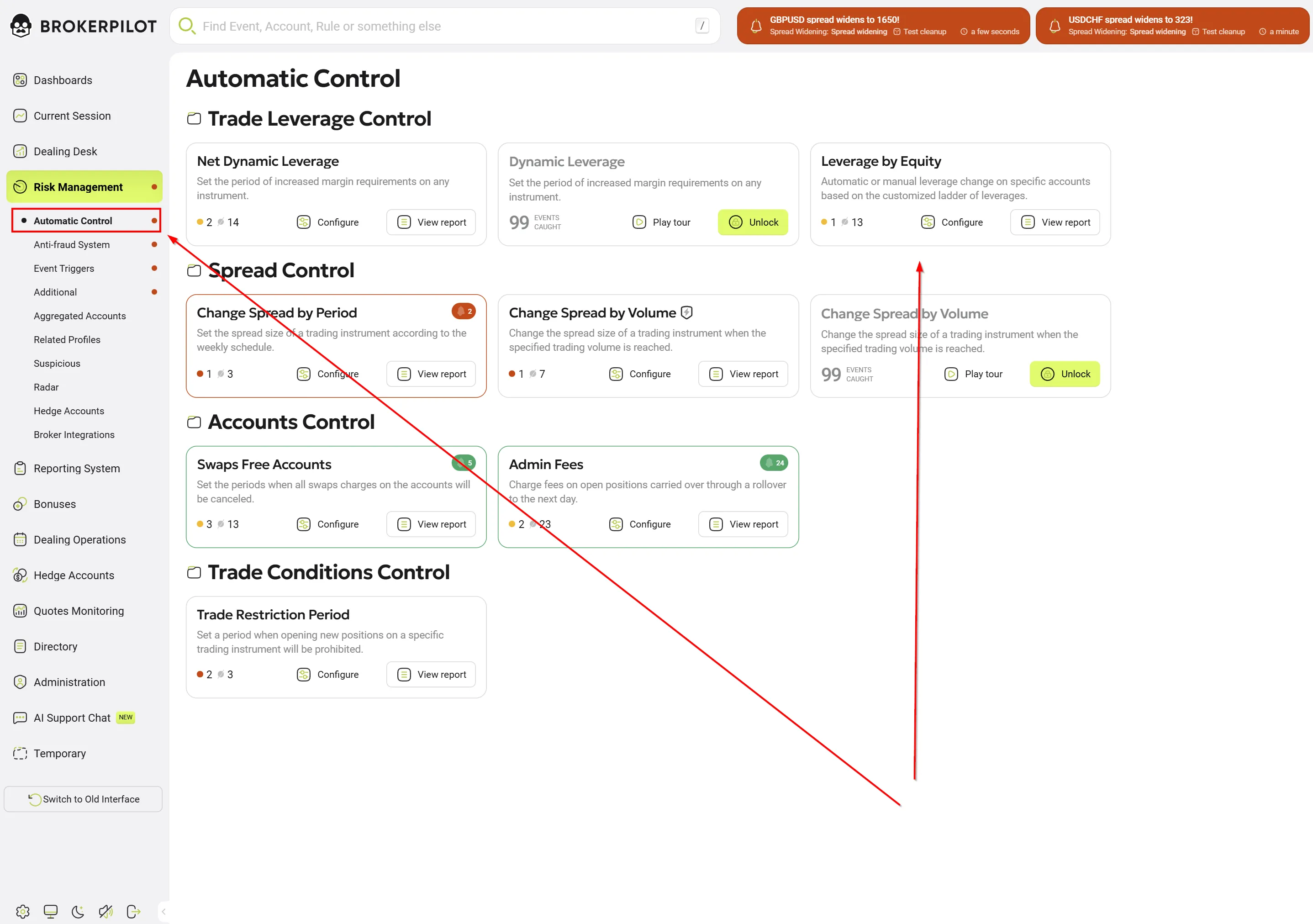
You can find the Leverage by Equity trigger in the section: 📌 Risk Management → Automatic Control → Leverage by Equity
Editing Settings

Basic parameters
| Parameter Name | Description |
|---|---|
| Rule Name | A unique name for the rule (e.g., "Retail Clients", "VIP Accounts"). |
| Active | Enable or disable the rule. |
| Notification Type | Notification severity: Warning (requires action) or Info (informational). |
| Account Groups | Specify the account groups to monitor. You can include or exclude specific groups. ⚠️ REQUIRED: You must specify at least one account group or at least one included account. |
| Included Accounts | Select individual accounts to monitor. ⚠️ REQUIRED: You must specify at least one account or at least one account group. |
| Use Max. Leverage Limit | Recommended: Enabled. When enabled, the trigger takes into account the maximum leverage set manually for the account and will never exceed it during automatic changes. |
| Leverages | Configure equity ranges by typing the leverage value and pressing Add button. Each threshold represents one level in the leverage ladder. |
Threshold Configuration
Each threshold defines the leverage level based on the equity range:
| Parameter | Description |
|---|---|
| Equity from (USD) | The lower bound of the equity range (inclusive). |
| Equity to (USD) | The upper bound of the equity range (exclusive). |
| Leverage | Target leverage for this equity range (e.g., 500 for 1:500). |
| Automatic Leverage Change | Enabled – leverage changes automatically; Disabled – requires manual confirmation. |
| Check margin level | Minimum margin level (%) for automatic leverage increase. Default: 50%. Recommended: 100% for a conservative approach. ⚠️ IMPORTANT: Applies only to regular leverage changes, NOT to weekend rules. |
| Weekend Settings | Enable special leverage rules for weekends (usually lower than usual). |
| Automatic change Weekend Leverage | Enable automatic leverage change during weekend transitions. |
| Weekend Period | Define the weekend period: From / Time from → To / Time to (e.g., Friday 21:00 → Sunday 21:00). |
Configuration Example
Standard configuration:
| Equity from | Equity to | Leverage | Auto Change | Weekend Leverage |
|---|---|---|---|---|
| $0 | $5,000 | 1:500 | ✅ Enabled | 1:300 |
| $5,000 | $20,000 | 1:400 | ✅ Enabled | 1:200 |
| $20,000 | $50,000 | 1:200 | ✅ Enabled | 1:100 |
| $50,000 | $100,000 | 1:100 | ❌ Disabled | 1:50 |
This creates a leverage ladder where leverage gradually decreases as equity grows.
Automation Note
Automatic Mode (Enabled)
When Automatic Leverage Change is enabled, the trigger:
- ✅ Automatically adjusts leverage when crossing equity threshold boundaries
- ✅ Creates informational notifications (Status: Info)
- ✅ Immediately applies changes to the trading platform
- ⚠️ Additional security checks are performed for increasing leverage:
- Margin level must be ≥ Check margin level
- The account must not be at risk of stop-out
- ⚠️ IMPORTANT: These checks apply only to regular leverage changes. For weekend rules, these checks do NOT apply - changes are made regardless of the margin level to reduce weekend risks.
Manual Mode (Disabled)
When Automatic Leverage Change is disabled, the trigger:
- 📋 Creates notifications requiring dealer confirmation (Status: Warning)
- 🔔 Sends alerts to the risk management dashboard
- ⏸️ Awaits manual approval before changing leverage
Best Practices
Enable automatic mode for:
- ✅ Reducing leverage
- ✅ Small accounts (< $10,000)
- ✅ Reducing leverage on weekends
Use manual mode for:
- ✅ Increasing leverage (High risk) – requires caution
- ✅ Large accounts (>$100,000)
- ✅ VIP and institutional clients
- ✅ Accounts with special agreements
Trigger Logic
Monitoring Process
The Leverage by Equity trigger continuously monitors accounts and performs the following checks:
1. Periodic Check (Touch)
- Frequency: Every 5 seconds
- Monitoring of active accounts (accounts with open positions)
- Checking accounts with recent balance operations (last 15 minutes)
2. Event-based Check
- Balance operations: Deposit, withdrawal, bonus, credit
- Account creation: New accounts are checked immediately
- Settings change: All accounts are re-evaluated when rules are changed
3. Full Check
- Performed when the server starts
- Performed when trigger settings are changed
- Checks all real accounts
Decision-Making Algorithm
For each monitored account, the trigger performs the following logic:
1. Check if the account meets the criteria:
   ├─ Is the account real (not demo)?
   ├─ Does the account belong to monitored groups?
   ├─ Is the account not excluded?
   └─ Equity > 0?

2. Find the applicable threshold:
   ├─ Find the threshold where: Equity from ≤ Account Equity < Equity to
   ├─ If equity exceeds all boundaries → use the maximum threshold
   └─ If equity is below all boundaries → use the minimum threshold

3. Determine the required action:
   ├─ If Account Leverage > Threshold Leverage:
   │  └─ Action: REDUCE leverage (Low-risk strategy)
   │
   ├─ If Account Leverage < Threshold Leverage:
   │  └─ Action: INCREASE leverage (High-risk strategy)
   │
   └─ If Account Leverage = Threshold Leverage:
      └─ Action: NONE (leverage is correct)

4. Check for pending notifications:
   ├─ If there is an unhandled manual notification for this account:
   │  └─ SKIP (wait for the existing notification to be processed by the dealer)
   │
   └─ If there are no pending notifications:
      └─ CONTINUE creating a new notification

5. Apply duplicate and error filters:
   ├─ If the last notification was created < 15 seconds ago:
   │  └─ SKIP (prevent rapid fluctuations)
   │
   ├─ If the previous attempt failed < 30 minutes ago:
   │  └─ SKIP (wait before retrying)
   │
   └─ If enough time has passed:
      └─ CONTINUE creating a notification

6. Create and distribute the notification:
   ├─ Create a notification with the target leverage
   ├─ Apply the maximum leverage limit (if enabled)
   ├─ Determine automatic or manual
   └─ Execute or queue for approval
Leverage Change Strategies
Low-Risk Strategy (Leverage Reduction)
Triggered when: Account Leverage > Threshold Leverage
Logic:
Account: Leverage = 1:500, Equity = $45,000
Threshold: Equity $20,000-$50,000 → Leverage 1:200

Decision: Reduce leverage from 1:500 to 1:200

Security checks:
✅ Leverage reduction is always considered safe
✅ Can be performed automatically even with open positions
✅ Margin level check is not required
High-Risk Strategy (Leverage Increase)
Triggered when: Account Leverage < Threshold Leverage
Logic:
Account: Leverage = 1:100, Equity = $3,000
Threshold: Equity $0-$5,000 → Leverage 1:500

Decision: Increase leverage from 1:100 to 1:500

Security checks:
⚠️ Check margin level ≥ Check margin level threshold
⚠️ Check that the account is not approaching stop-out
⚠️ If checks fail → create a notification for manual processing
Automatic increase only if:
- ✅ Margin level ≥ Check margin level threshold (default 50%)
- ✅ No risk of stop-out
- ✅ Automatic mode is enabled
⚠️ IMPORTANT: These checks apply only to regular leverage changes. For weekend rules, margin and stopout checks are NOT applied.
Weekend Logic
When Weekend Rules are enabled:
⚠️ IMPORTANT FEATURE OF WEEKEND RULES:
Weekend leverage changes (reduction and restoration) are performed without checking the margin level and without checking stopout. This means that:
- ✅ Leverage will be reduced before the weekend regardless of the account's margin level
- ✅ Leverage will be restored after the weekend regardless of the account's margin level
- ✅ The "Check margin level threshold" setting does NOT apply to weekend rules
- 🎯 This is done specifically for maximum protection against weekend risks
Weekend Start (e.g., Friday 21:00)
1. Weekend period begins
2. For each monitored account:
   ├─ Current leverage: 1:500
   ├─ Weekend leverage: 1:100
   └─ Action: REDUCE to 1:100

Result: Low weekend leverage strategy
Weekend End (e.g., Sunday 21:00)
1. Weekend period ends
2. For each account with reduced leverage:
   ├─ Current leverage: 1:100
   ├─ Regular threshold leverage: 1:500
   └─ Action: RESTORE to 1:500

Result: High weekend leverage strategy
Benefits of the weekend strategy:
- 🛡️ Protection against market gaps on weekends
- 📉 Reduced risk during periods of low liquidity
- 🔄 Automatic restoration when the market opens
- 📊 Historically reduces weekend losses by 60-80%
Maximum Leverage Limit System
The Use Max. Leverage Limit feature provides intelligent management of leverage limits:
How it works
1. External Change Detection
⚠️ IMPORTANT FEATURE OF DETECTION:
The trigger checks the current account leverage against both values from the last notification (old AND new):
- If the current leverage matches the old OR new value → NO external change
- If the current leverage differs from the old AND from the new value → YES external change
This means that if the dealer changes the leverage to a value that is already in the current change ladder, the trigger will not create a notification about the external change.
Example 1: The trigger will NOT detect an external change
├─ Notification created: change leverage from 1:500 to 1:200
├─ Dealer manually sets leverage to 1:200 (matches the new)
└─ Trigger: NO external change (1:200 = target leverage)

Example 2: The trigger will NOT detect an external change
├─ Notification created: change leverage from 1:500 to 1:200
├─ Dealer manually returns leverage to 1:500 (matches the old)
└─ Trigger: NO external change (1:500 = original leverage)

Example 3: The trigger will detect an external change
├─ Notification created: change leverage from 1:500 to 1:200
├─ Dealer manually sets leverage to 1:300 (does not match either)
└─ Trigger: YES external change
    └─ Saves 1:300 as the maximum leverage for this account
2. Applying the Maximum Limit
Later: The trigger tries to increase leverage
├─ The threshold suggests leverage 1:500
├─ The system checks the maximum leverage: 1:300
└─ Result: Leverage is set to 1:300 (not 1:500)
    └─ Notification: "Leverage limited to maximum 1:300"
3. Updating the Maximum
If the dealer changes the leverage again:
├─ The dealer sets leverage to 1:400
├─ The trigger detects the change
└─ The maximum leverage is updated to 1:400
Advantages
- ✅ Takes manual changes into account – Respects the risk manager's decisions
- ✅ Prevents unwanted increases – Does not override manual restrictions
- ✅ Flexible management – Can be adjusted at any time by dealers
- ✅ Full audit – All changes are logged and tracked
Example scenario
Day 1: A problem account is identified
├─ Account 100001 is trading aggressively
├─ The risk manager manually reduces: 1:500 → 1:100
└─ The system saves the maximum: 1:100

Day 2: Equity fluctuates
├─ Equity falls to $3,000
├─ The threshold suggests: 1:500
├─ The system applies the maximum: 1:100
└─ Leverage remains: 1:100 ✅

Day 7: The account stabilizes
├─ The risk manager checks the account
├─ Manually increases: 1:100 → 1:200
└─ New maximum: 1:200 (the system adapts)
Leverage Change Error Handling
Protection Mechanism Against Repeated Errors
When an attempt to change leverage fails (for example, due to problems with the trading platform), the trigger automatically applies protective logic:
1. Blocking Retries (30 minutes)
Scenario: Leverage change error
├─ Leverage cannot be changed due to an MT4/MT5 error
├─ Special notifications is created
├─ The notification is marked as UNPROCESSED
├─ The notification status changes to ALERT (to attract the attention of operators)
├─ The trigger blocks retries for this account for 30 minutes
└─ After 30 minutes, the trigger will try to change the leverage again
2. Automatic Identification of Failed Actions and Cleanup
During the next account check:
├─ If the previous notification has an action with the type "Action Failed":
│  ├─ Check the action creation time
│  ├─ If less than 30 minutes have passed:
│  │  └─> Skip creating a new notification
│  └─ If more than 30 minutes have passed:
│     ├─> Automatically accept the old notification with the error
│     ├─> The old notification disappears from the list of unprocessed notification
│     └─> Create a new notification and try again
└─ If the action is successful:
   └─> Apply the usual filtering rules (15 seconds)
3. Periodic Cleanup (24 hours)
The system automatically cleans up records of failed attempts:
├─ All records are checked every 24 hours
├─ Records older than 24 hours are deleted
└─> This prevents endless data accumulation
Benefits of Error Protection
- ✅ Spam Prevention – No constant attempts to change leverage every 5 seconds in case of an error
- ✅ Resource Saving – Reduced load on the trading platform
- ✅ Automatic Recovery – After 30 minutes, the trigger will automatically retry
- ✅ Visibility for Operators – notifications with errors remain unprocessed with Alert status
- ✅ Automatic Cleanup – When a new notification is created, the old notification with the error is automatically accepted
- ✅ Information – All errors are logged and informational notifications are created
Operator Actions in Case of Errors
When a notification with an error appears in the system:
-
Problem Identification:
- The notification has the status Alert (red)
- The notification is marked as unprocessed
- The action contains information about the error
-
Possible Actions:
- Wait for automatic retry (after 30 minutes)
- Change leverage manually via MT4/MT5 Manager
- Accept the notification if the problem is resolved
- Add the account to exceptions if you need to disable automatic management
-
Diagnostics:
- Check the availability of the MT4/MT5 server
- Check the trigger logs for error details
- Make sure the account is active and not blocked
Example Error Handling Scenario
12:00 – Attempt to change leverage from 1:500 to 1:200
      ├─> Error: "MT5 API Error: Cannot change leverage"
      ├─> Action created: Account Change Leverage Action Failed
      ├─> Notification marked: Processed = false, Status = Alert
      ├─> Notification visible to the operator in the list of unprocessed notifications
      └─> Trigger remembers the error time

12:05 – Periodic account check
      └─> SKIPPED (only 5 minutes have passed, 30-minute block)
      └─> Notification remains unprocessed and visible

12:15 – Periodic account check
      └─> SKIPPED (only 15 minutes have passed, 30-minute block)
      └─> Operator sees notification and can intervene manually

12:35 – Periodic account check
      ├─> 35 minutes have passed – block removed
      ├─> Old notification with error automatically accepted
      ├─> Old notification disappeared from the list of unprocessed notifications
      └─> New attempt to change leverage
          ├─> If successful:
          │   ├─ Leverage changed
          │   └─ New successful notification created
          └─> If error:
              ├─ New 30-minute block
              └─ New notification remains Alert and unprocessed
Event Types and Lifecycle
1. Account Leverage Notification
Created when:
- Equity crosses the threshold
- Current leverage does not match the threshold
Information:
Login: 100001
Equity: $45,000
Current leverage: 1:500
Required leverage: 1:200
Status: Warning (manual) or Info (automatic)
Auto: on/off
Time: 2024-10-24 14:30:00
2. Account Weekend Leverage Notification
Created when:
- Weekend period starts/ends
- Leverage adjustment is required for the weekend
Information:
Login: 100001
Current leverage: 1:500
Weekend leverage: 1:100
Action: Reduce for the weekend / Restore after the weekend
Auto: on/off (based on weekend settings)
3. Account External Leverage Change Notification
Created when:
- Leverage is changed manually by a dealer
- Change detected outside the trigger
Information:
Login: 100001
Old maximum leverage: 1:500
New maximum leverage: 1:300
Changed by: Dealer Ivan
Status: Info (informational only)
4. Account Change Leverage Action Failed
Created when:
- Attempt to change leverage failed
- Trading platform returned an exception
Information:
Login: 100001
Old leverage: 1:500
Target leverage: 1:200
Error: "MT5 API Error: Cannot change leverage"
Status: Info (informational)
Features:
- Automatically blocks retries for 30 minutes
- Trigger does not create duplicate notifications until the block time expires
- After 30 minutes, the trigger will automatically try again
Event Handling
Automatic notifications (Auto = onn):
1. Notification created with status: Info
2. Leverage immediately changed on the trading platform
3. Notification sent to the risk management panel
4. Notification marked as processed
Manual Notifications (Auto = off):
1. Notification created with status: Warning
2. Alert sent to the dealer
3. Dealer checks and makes a decision:
   ├─ Accept: Apply the leverage change
   ├─ Reject: Cancel the notification, leave the current leverage
   └─ Change: Change the leverage to a custom value
4. Notification marked as processed after dealer action
Real-World Use Cases
Example 1: Standard Clients
Scenario: Small broker with 5,000 clients, accounts from $100 to $50,000
Configuration:
Rule: "Real accounts"
Groups: "real-standard", "real-cent"

Thresholds:
$0 - $1,000:         1:500 (Auto: Enabled)
$1,000 - $10,000:    1:400 (Auto: Enabled)
$10,000 - $30,000:   1:200 (Auto: Enabled)
$30,000 - $100,000:  1:100 (Auto: Disabled - manual check)

Use max leverage limit: Enabled
Weekend rules: Disabled
Results:
- ✅ Company losses from stop-outs reduced by 35%
- ✅ 90% of leverage adjustments automated
- ✅ Improved risk management without client complaints
Example 2: Weekend Protection for Cryptocurrencies
Scenario: Broker trading crypto CFDs, high volatility on weekends
Configuration:
Rule: "Weekend protection for cryptocurrencies"
Groups: "crypto-real"

Thresholds:
$0 - $5,000:      Normal: 1:100 → Weekend: 1:20
$5,000 - $20,000: Normal: 1:50  → Weekend: 1:10
$20,000+:         Normal: 1:25  → Weekend: 1:5

Weekend period: Friday 23:00 - Sunday 23:00
Automatic weekend change: Enabled
Results:
- ✅ Weekend losses reduced by 60%
- ✅ Weekend margin calls reduced by 80%
Example 3: VIP Clients with a Personalized Approach
Scenario: Large broker with a VIP program for institutional clients
Configuration:
Rule: "VIP Clients - Conservative"
Groups: "real-vip", "real-pro"

Thresholds:
$0 - $50,000:       1:200 (Auto: Enabled, Min margin: 100%)
$50,000 - $200,000: 1:100 (Auto: Disabled)
$200,000+:          1:50  (Auto: Disabled)

Use max leverage limit: Enabled
Notification type: Info (less intrusive)
Results:
- ✅ Conservative leverage by default
- ✅ Manual check for large changes
- ✅ High VIP client satisfaction
- ✅ Reduced risk exposure
Best Practices
1. Designing Threshold Levels
✅ Good practice: Gradual reduction
$0-5k:       1:500 (beginners, small amounts)
$5k-20k:     1:300 (mid-level)
$20k-50k:    1:200 (experienced)
$50k-100k:   1:100 (large accounts)
$100k+:      1:50  (VIP/institutional)
❌ Bad practice: Sharp transitions
$0-10k:   1:500
$10k-11k: 1:50  ← Too sharp! Can cause margin calls
2. Automation Settings
Enable automatic mode for:
- ✅ Leverage reduction (always safe)
- ✅ Small changes (500→400, 200→100)
- ✅ Weekend reductions
- ✅ Accounts <$10k
Use manual mode for:
- ✅ Leverage increase (requires caution)
- ✅ Large accounts (>$100k)
- ✅ VIP clients
- ✅ Sharp changes (100→500)
3. Minimum Margin Percentage Settings
⚠️ IMPORTANT: Check margin threshold" setting applies only to regular leverage changes. For weekend rules, this setting does NOT apply - weekend changes are performed regardless of the margin level.
Conservative (Recommended):
Min. % margin: 100%
- Auto-increase only when very safe
- No open losing positions
Moderate:
Min. % margin: 50%
- Auto-increase with sufficient margin
- Some positions allowed
Aggressive (High risk):
Min. % margin: 30%
- More flexible auto-increase
- Not recommended for most brokers
4. Weekend Configuration
Standard Forex:
Period: Friday 21:00 → Sunday 21:00
Reduction: by 1-2 leverage levels
Example: 1:500 → 1:300 → 1:100
High volatility (Cryptocurrencies, Indices):
Period: Friday 20:00 → Monday 01:00
Reduction: by 3-5 times
Example: 1:100 → 1:20, 1:50 → 1:10
5. Testing Before Production
Phase 1: Test Group (Days 1-3)
- 10 accounts in the test group
- Enable detailed logging
- Monitor all changes
Phase 2: Small Rollout (Days 4-7)
- 100 accounts
- Analyze metrics daily
Phase 3: Medium Rollout (Days 8-14)
- 1,000 accounts
- Weekly performance review
Phase 4: Full Production (Day 15+)
- All accounts
- Continuous optimization
6. Always Enable the Maximum Leverage Limit
Why this is critical:
WITHOUT a maximum leverage limit:
1. Dealer identifies a problematic account
2. Manually reduces: 1:500 → 1:100
3. Equity changes after an hour
4. Trigger automatically increases back to 1:500 ❌
5. Problem returns

WITH a maximum leverage limit:
1. Dealer reduces: 1:500 → 1:100
2. System saves the maximum: 1:100
3. Equity changes after an hour
4. Trigger tries to increase to 1:500
5. System limits to the maximum: 1:100 ✅
6. Problem remains under control
Frequently Asked Questions
Q1: Why can't I enable a rule without specifying accounts or groups?
Answer: The validation system requires that each rule has at least one account or at least one account group specified. This prevents the creation of "empty" rules that:
- Do not work with any account
- Mislead the operator (rule is enabled, but nothing happens)
- Create a false sense of security
Solution: When setting up a rule, be sure to specify:
- At least one account group in Account Groups, OR
- At least one account in Included Accounts
Error message:
"You need to select at least one account or accounts group for the trigger to work."
Q2: What happens if a client has open positions?
When reducing leverage:
- Changes immediately
- Open positions remain
- Free margin decreases
- Margin call may trigger earlier
When increasing leverage:
- System checks the margin level
- If safe (margin ≥ threshold) → Automatic change
- If risky → Manual check required
⚠️ IMPORTANT for weekend rules:
- Weekend leverage changes are performed without checking the margin level
- This means that leverage will be changed (reduced/restored) regardless of open positions
- The "Min. % margin for auto" setting does NOT apply to weekend rules
- This is done for maximum protection against weekend risks
Q3: How often are accounts checked?
Continuous monitoring:
- Active accounts: Every 5 seconds
- Balance operations: Immediately
- New accounts: Immediately
- Settings change: All accounts immediately
Q4: Can I exclude certain accounts?
Yes, two methods:
- Exclusion list in the rule:
Rule: "Retail clients"
Groups: "real-standard"
Excluded accounts: 100001, 100002, 100003
- Separate rule with high priority:
Rule: "VIP Exclusions"
Priority: 1 (highest)
Included accounts: 100001, 100002, 100003
Thresholds: (no changes or special settings)
Q5: What to do if a client complains about an automatic change?
Solution steps:
- Check history – View notifications and equity changes
- Explain policy – Show applied threshold rules
- Offer solutions:
- Create an exception for this client
- Transfer to another group (VIP/Pro)
- Temporarily exclude from the rule
Q6: How to safely test the configuration?
Testing methods:
- Test group:
Rule: "Test - New configuration"
Groups: "test-real"
- Use 5-10 test accounts
- Monitor for 1-2 days
- Dry run mode:
Rule: "Production - Dry run"
Auto-change: DISABLED (all manual)
- Analyze created notifications without actual changes
- A/B testing:
Group A: With trigger (1000 accounts)
Group B: Without trigger (1000 accounts)
Compare metrics after 2 weeks
Conclusion
The Leverage by Equity trigger is a powerful risk management tool that:
- ✅ Reduces broker losses by 40-60% through automatic leverage control
- ✅ Automates operations – up to 90% of leverage changes
- ✅ Protects clients from excessive risks
- ✅ Flexible configuration for various client segments
- ✅ Comprehensive monitoring and audit
Recommended implementation path:
- Study existing configurations and best practices
- Develop rules for your company
- Test on a small group of accounts (1-2 weeks)
- Gradual rollout to production
- Monitor effectiveness and adjust settings
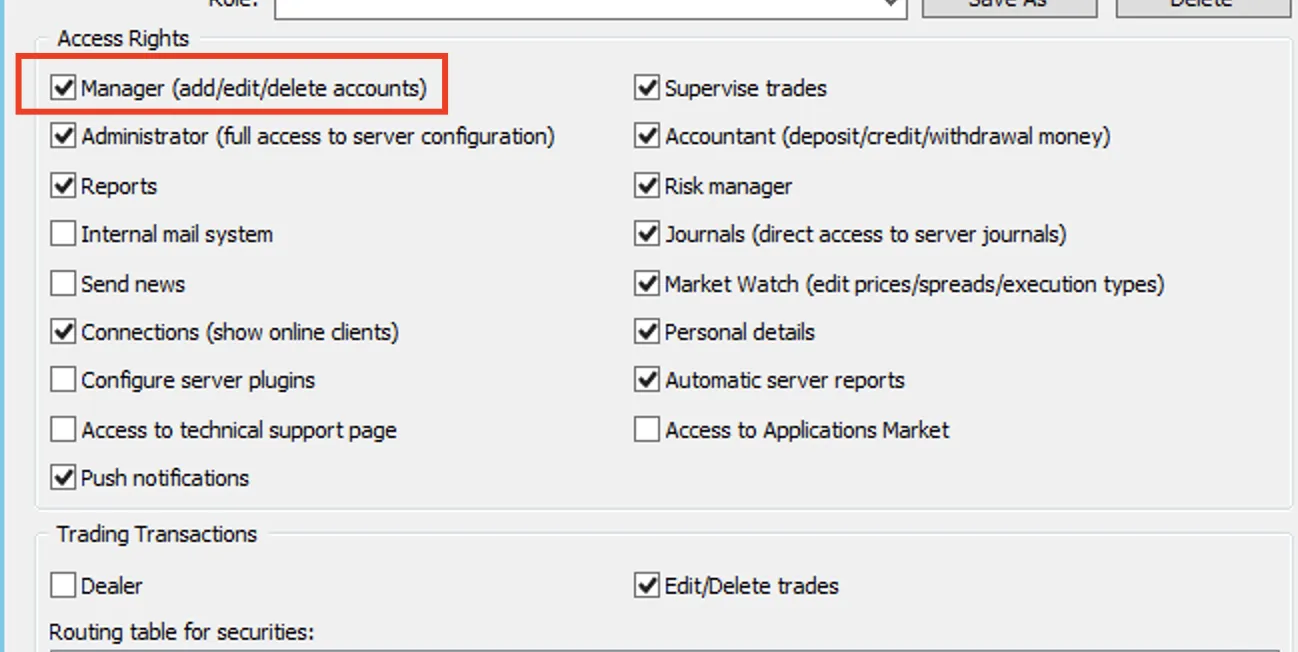
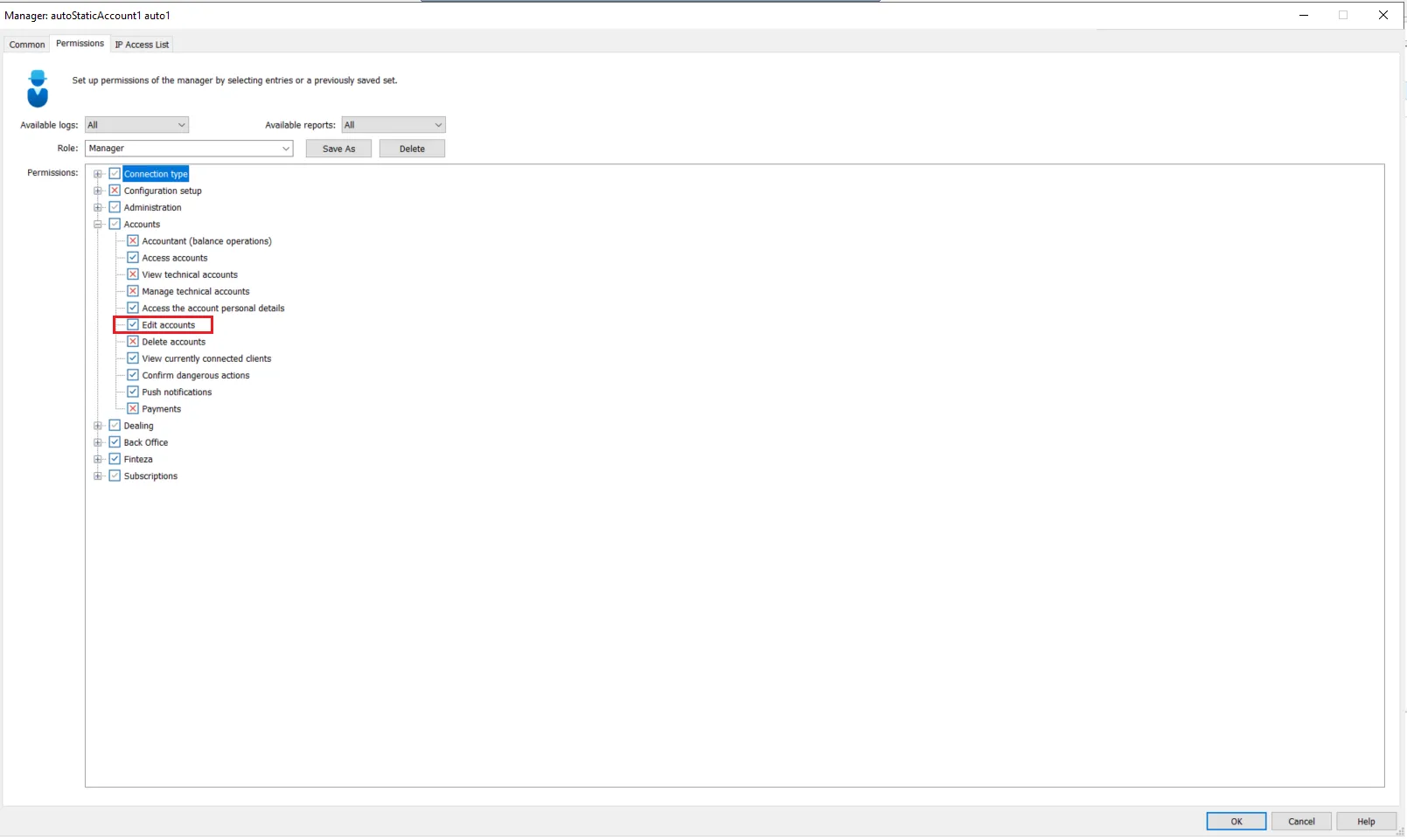
Permissions
| MT4 | MT5 |
|---|---|
 |  |