Email Sender
1. Purpose & Objective
The Email Sender module is designed to facilitate mass communication between the brokerage and its clients. It allows for the creation and scheduling of electronic messages delivered directly to the MT4/MT5 Mailbox (the internal mailing system of the trading terminals).
This tool is essential for notifying traders about:
- Changes in margin requirements during high-impact news.
- Upcoming holidays or market hour changes.
- Technical maintenance or administrative updates.
2. System Overview
To ensure high performance and stability, the system uses specialized Server Plugins for MT4 and MT5. This approach bypasses the limitations of the MT4 Manager API and ensures that email delivery does not interfere with trading operations.
Key Capabilities
- Template Management: Create, edit, and store reusable HTML templates.
- WYSIWYG & HTML Editor: Toggle between a visual "What You See Is What You Get" editor and raw HTML code for precise formatting.
- Advanced Targeting: Define recipient lists using Server selection, Account Groups, or specific Login inclusion/exclusion.
- Scheduling: Immediate dispatch or Delayed Task execution via the integrated Brokerpilot calendar.
- Statistics & History: Track the results of executed mailings and manage upcoming tasks.
3. Definitions & Terms
- Mailbox: The trader's internal postal system within the MetaTrader 4/5 terminals.
- Template: A saved HTML body for email distributions.
- Delayed Task: A scheduled operation within the Brokerpilot Dealing Operations calendar.
- Plugin: A specialized component installed on the trading server to handle Server API commands for email delivery.
4. Operational Workflow
Step 1: Configuration
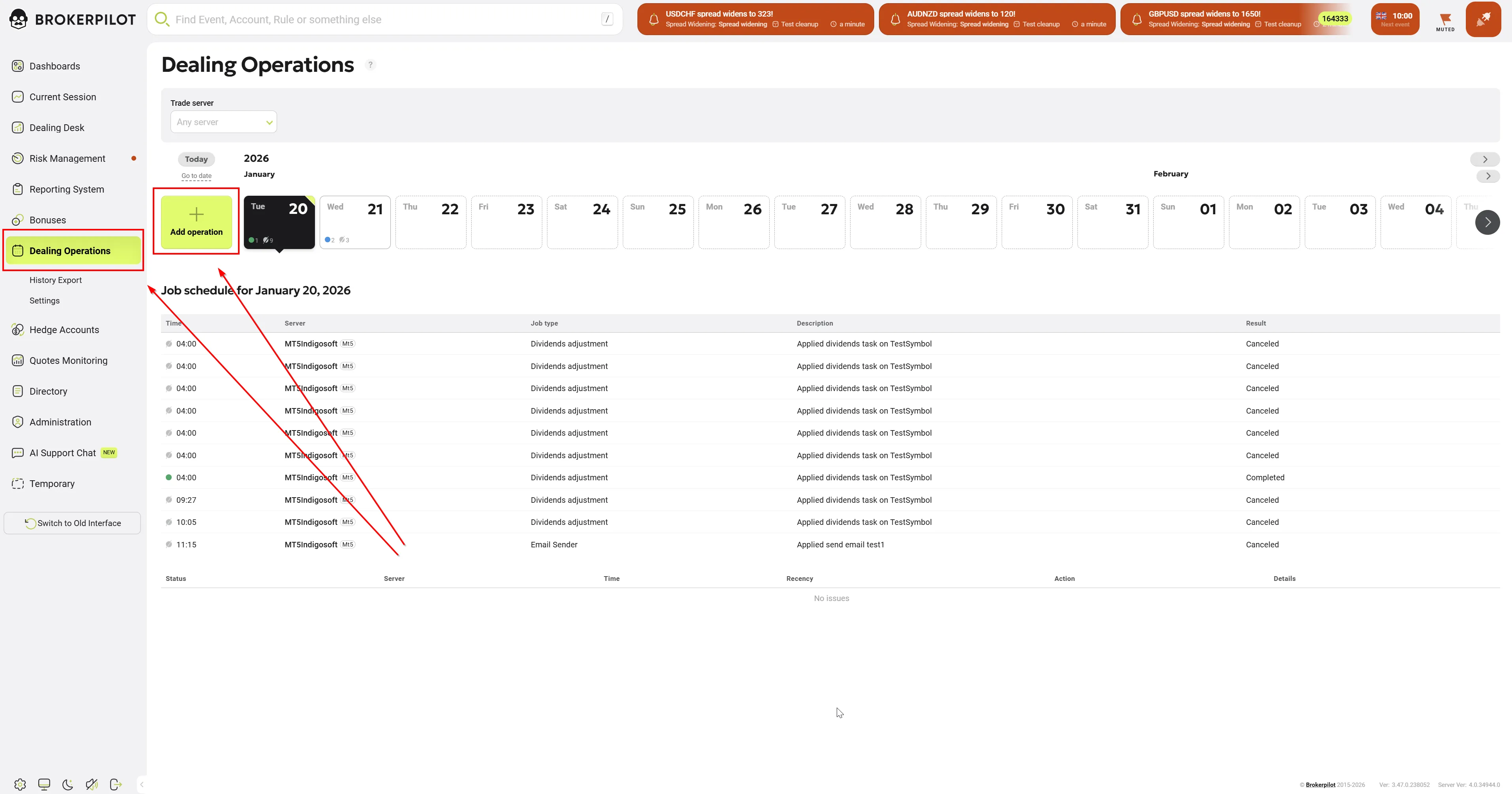
Navigate to Dealing Operations -> Add Operation and select Email sender.
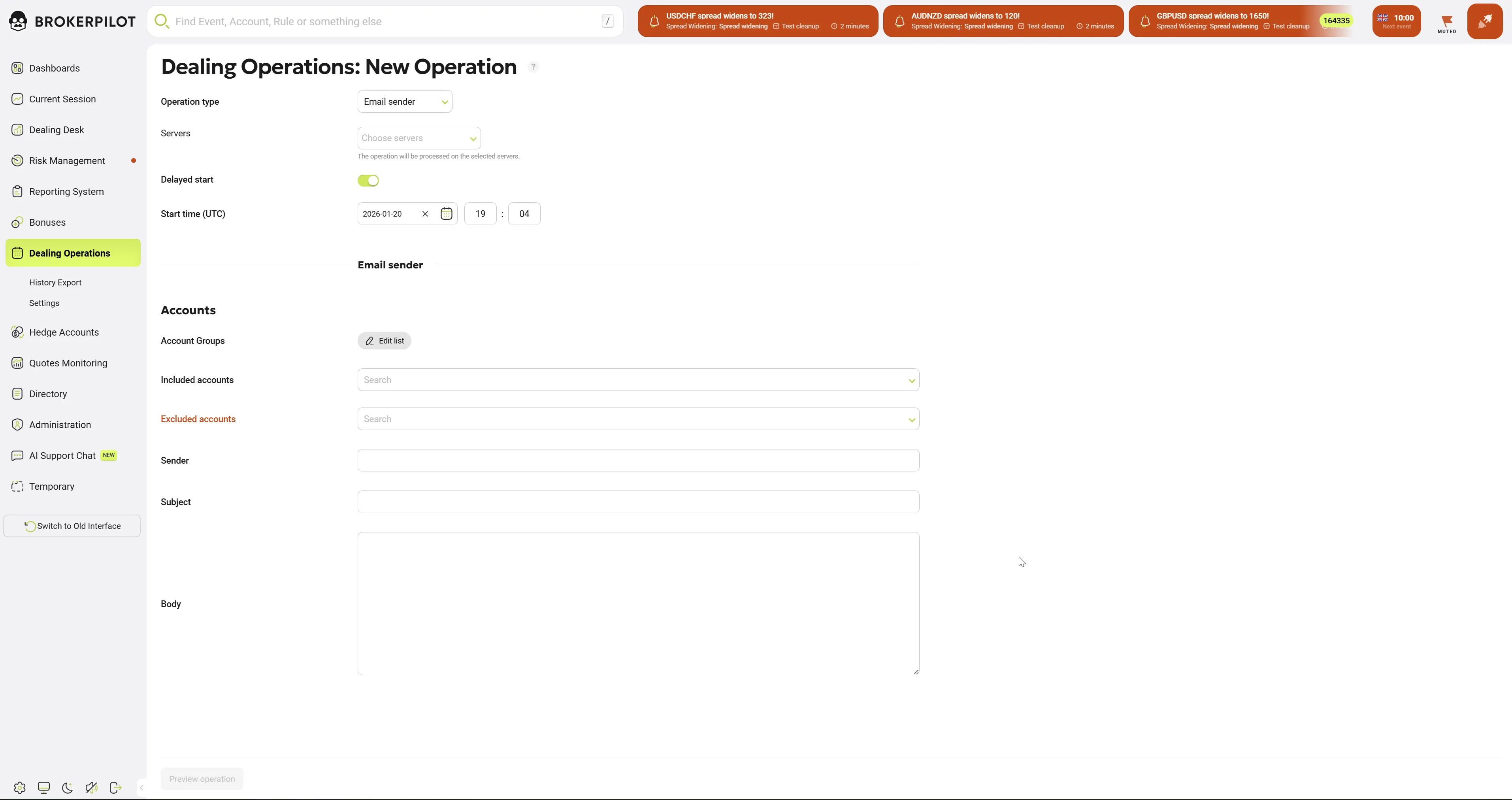
- Servers: Choose the trading servers where the recipients are located. If multiple servers are selected, individual tasks will be created for each server.
- Delayed Start: Enable this to schedule the mailing.
- Start time (UTC): Set the specific date and time for the mailing to begin.
Step 2: Recipient Targeting (Accounts)
- Account Groups: Select specific groups (e.g., "Real_Standard"). If multiple servers were selected, group lists are merged.
- Included accounts: Manually add specific account logins.
- Excluded accounts: Remove specific logins (e.g., internal or test accounts) from the distribution.
Step 3: Email Content
- Sender: Enter the company or department name (e.g., "Brokerpilot").
- Subject: The title of the email (also serves as the description in the task calendar).
- Body: The message text. Uses an open-source HTML component for formatting.
Note: Currently, emails are impersonalized to allow sending to multiple logins simultaneously at a rate of approximately 1 message per second.
5. Preview & Execution
Once all mandatory fields are valid, the Preview operation button becomes available.
- Preview Displays a summary including the list of servers, the number of target accounts per server, the message body, and the scheduled time.
- Scheduling: Upon confirmation, the task is placed in the calendar.
6. Managing Tasks
- Planned Tasks: Can be viewed, edited, or deleted from the calendar at any time before execution.
- Executed Tasks: Results are available for review, showing the delivery status and the template used.
7. Technical Requirements
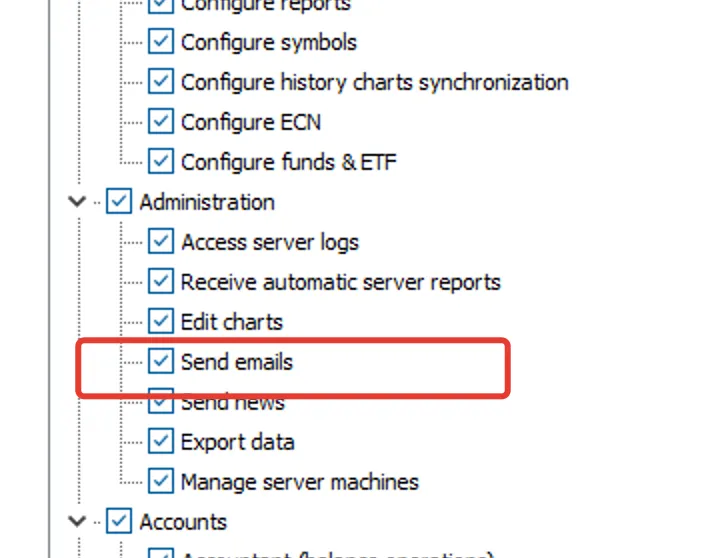
- Permissions: A dedicated user permission is required to access the Email Sender functionality on MT5 platform.
- Plugin installation: Requires Brokerpilot plugins to be active on the target MT4 servers.
- Limits: Delivery speed and the number of logins per single email are determined by the platform (MT4 vs MT5).