Accounts
1. Purpose
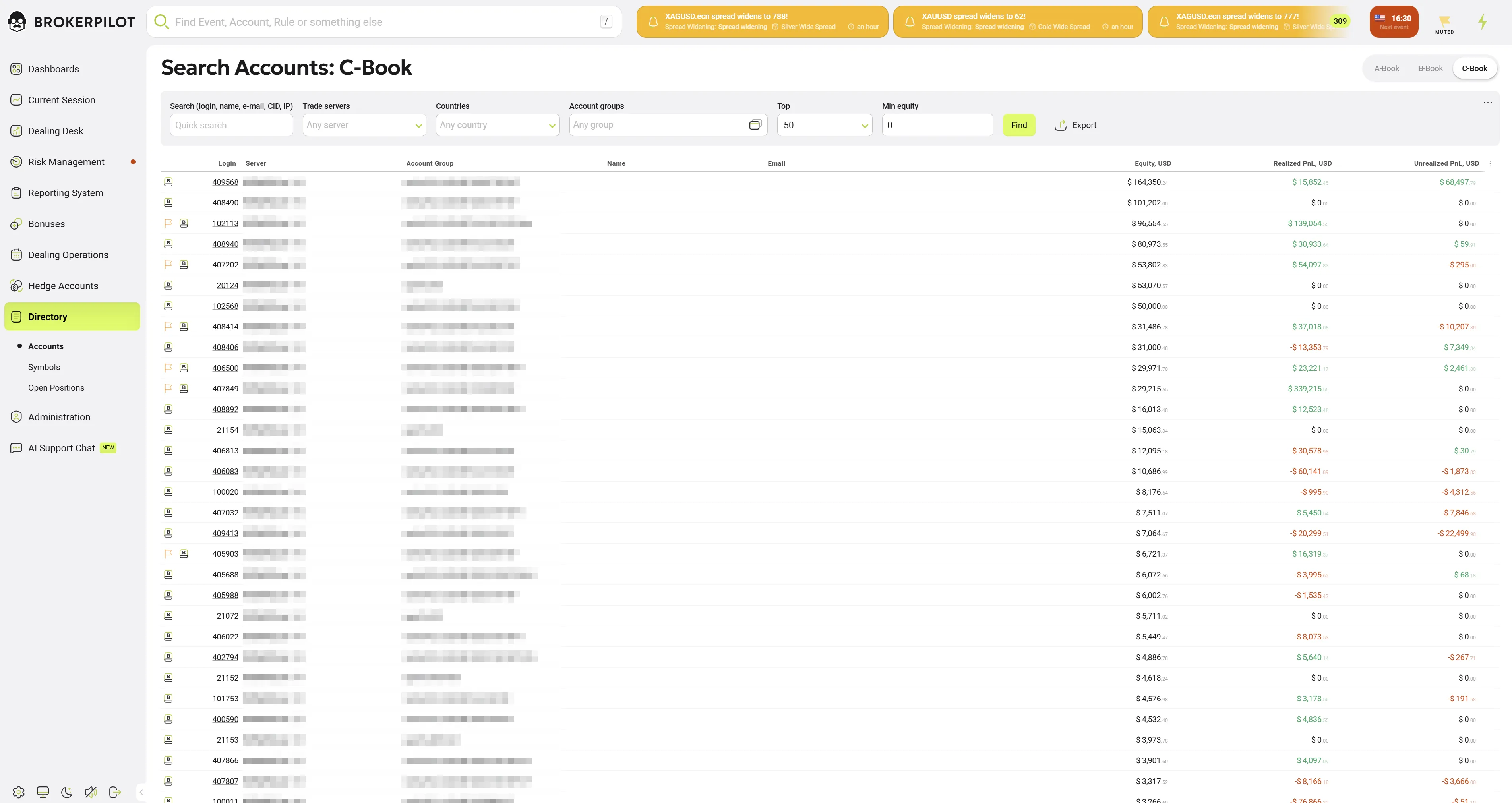
The Accounts page is a core administrative page of the Brokerpilot system. It provides real-time monitoring, filtering, and management of trading accounts. This interface allows dealers and risk managers to track equity, profitability, and account status across various trading servers (MT4, MT5, cTrader) in a single unified view and allows quick switching between different risk models: A-Book, B-Book, and C-Book.
2. Filtering & Search Criteria
The control panel at the top allows for precise data segmenting:
| Field | Description |
|---|---|
| Search | Full-text search by Login, Name, Email, UID, or IP address. |
| Trade Servers | Dropdown to filter by specific MT4/MT5 or cTrader servers. |
| Countries | Filter accounts based on the client's geographical location. |
| Account Groups | Filter by internal platform groups (e.g., demoStandard). |
| Top | Limit the results to a specific number (e.g., Top 50, 100, 500). |
| Min Equity | Show only accounts with equity exceeding a specific USD value. |
3. Account Data Table
The table displays live financial data. Key columns include:
Account Info
- Login / Server: The platform login ID and the specific server/platform icon (e.g., MetaTrader 4, MetaTrader 5, cTrader).
- Account Group: The specific server-side group assigned to the account.
- Name & Email: Personal identifier details for the account holder.
Financial Metrics (USD)
- Equity: The current floating value of the account. Large values are displayed in a clear, formatted style.
- Realized P&L: The total profit or loss from already closed trades.
- Green: Profit
- Red: Loss
- Unrealized P&L: The floating profit or loss of currently open positions.
4. Key Features
- Cross-Platform Visibility: Simultaneous monitoring of multiple trading platforms in one list.
- Real-Time Updates: Financial columns (Equity/P&L) refresh dynamically.
- Export Functionality: Allows downloading the filtered list of accounts for offline audit or reporting.
- Row Highlighting: Selected or hovered accounts are highlighted for better visual tracking.
5. Operational Use Cases
- High-Equity Monitoring: Identify the largest accounts in the C-Book to manage exposure.
- Loss Analysis: Identify accounts with significant realized losses for potential risk adjustment.
- Technical Audit: Verify that accounts are correctly assigned to the appropriate server and group.